
QuickBooks balances
QuickBooks Balances puts each QuickBooks account's balance next to the book balance of the token cards booked to it, so you can see whether SimplyLedger and QuickBooks agree before you close a period.
Select Reconcile in the sidebar's icon rail, then Reconciliations → QuickBooks Balances.
Before you start
- QuickBooks switched on for the entity. The entry only appears in the sidebar once it is. Opening the page without it shows "This area is only available when QuickBooks integration is enabled for this entity." with a QuickBooks settings link. See QuickBooks.
- Token cards linked to QuickBooks accounts. Only accounts used by token cards are listed. See linking a QuickBooks account.
- A synced QuickBooks balance for each account. SimplyLedger compares against the last balance it read from QuickBooks, not a live figure. See resyncing balances.
A viewer sees the same figures. Resyncing a balance needs write access.
The account list
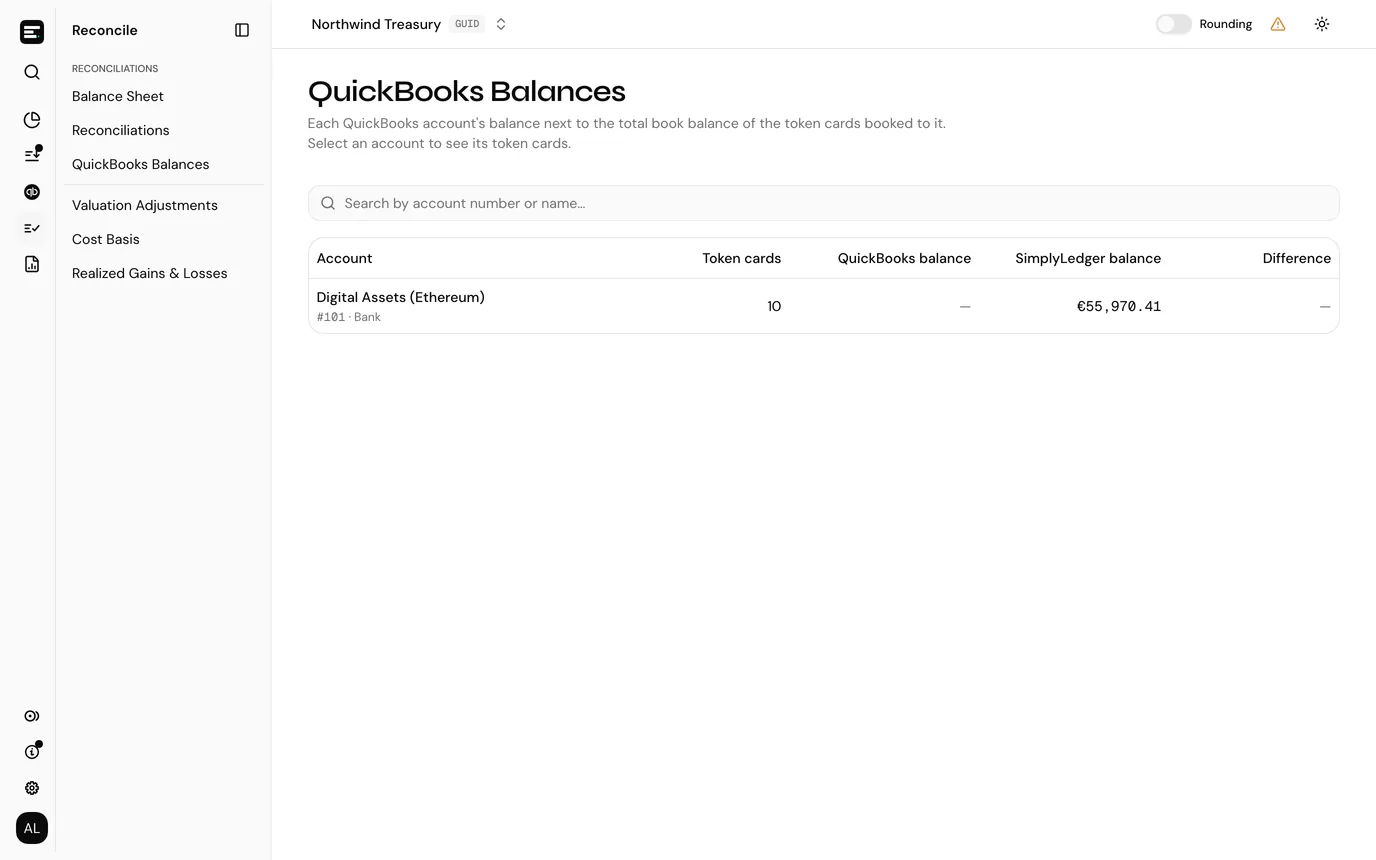
Each row is one QuickBooks account that token cards can book to:
| Column | What it shows |
|---|---|
| Account | The account name, with its number and QuickBooks account type under it. |
| Token cards | How many token cards are booked to the account. |
| QuickBooks balance | The balance last synced from QuickBooks, with Updated and the time under it. A dash means it has never been synced. |
| SimplyLedger balance | The sum of those token cards' book balances, in your entity currency. |
| Difference | SimplyLedger balance minus QuickBooks balance, rounded to the cent. Greyed out when it is zero. A dash means there is no QuickBooks balance to compare with. |
Every column sorts. The search box matches account number or name.
If some token cards have no QuickBooks account, a notice above the table says how many, and how much book balance is left out of every row. Its Balance Sheet link opens the token cards list, where you can link them.
If no account is used by a token card yet, the table says No token card accounts.
An account's breakdown
Select a row to open the account. The page is headed with the account name and number, and Back to QuickBooks balances returns to the list.
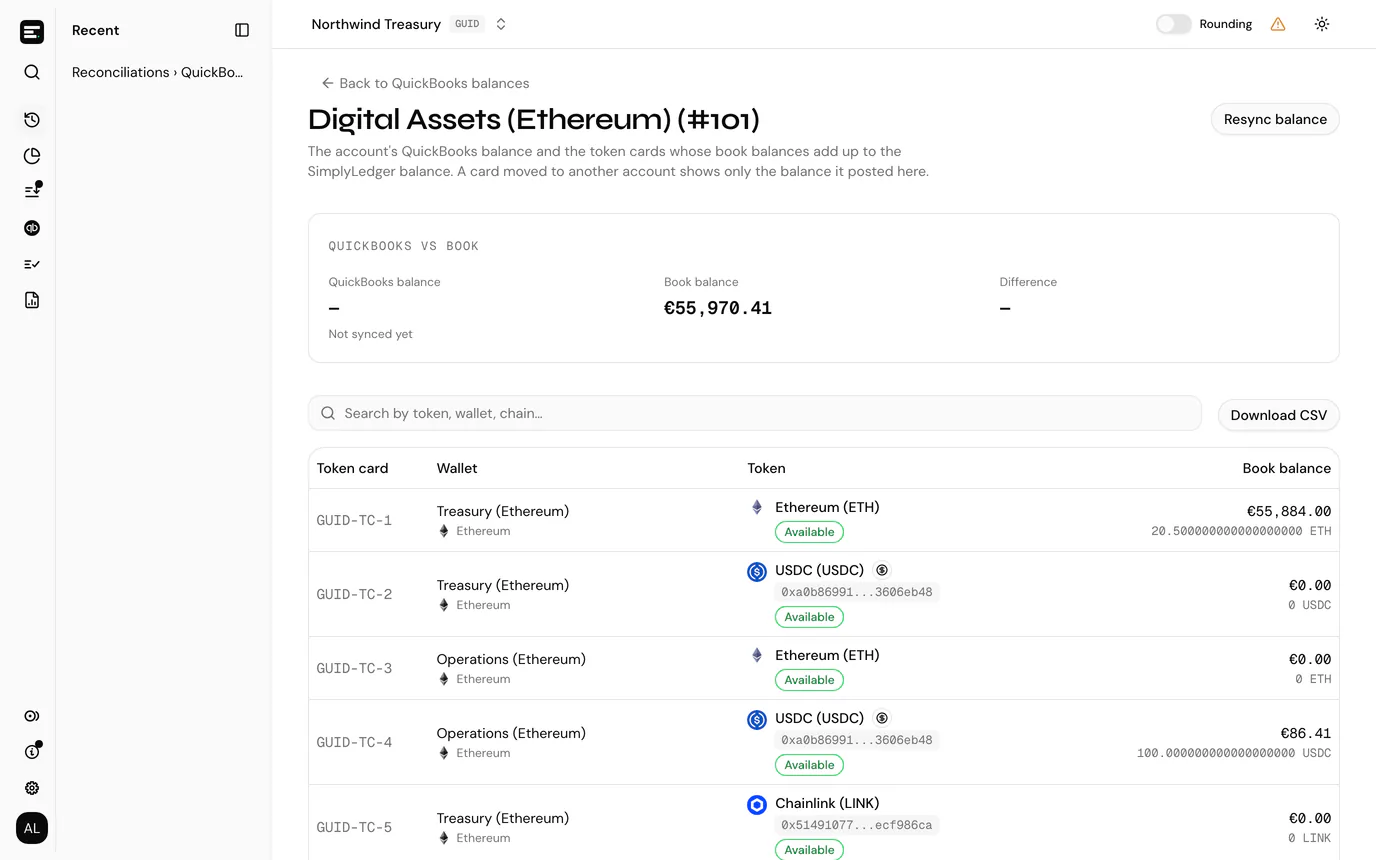
The QuickBooks vs book panel shows three figures:
| Figure | Meaning |
|---|---|
| QuickBooks balance | The last synced balance, with Synced and the time under it, or Not synced yet. |
| Book balance | The total of the token cards below. It is the same figure as SimplyLedger balance on the list. |
| Difference | Book balance minus QuickBooks balance. When it is zero the panel shows a Tied badge. |
Below it, one row per token card booked to the account: Token card reference, Wallet with its chain, Token with its holding type (and delegation protocol for delegated cards), and Book balance as a token amount with its value in your entity currency. The book balances add up to the Book balance figure above.
A token card moved to another QuickBooks account keeps its earlier postings on this one. It stays in the list, shows only the balance it posted here, and says Now posts to with its new account under the token. Postings made after the move count on the new account.
- The search box matches token, wallet or chain.
- Select a row to open the token card.
- Download CSV exports every token card with its wallet, chain, token, token address, holding type, delegation protocol and book balance, followed by Total, QuickBooks balance and Difference rows.
Resync balance
Resync balance, at the top of the page, reads the account's balance from QuickBooks again. You see "Balance resynced from QuickBooks", and the figures update. It needs write access, and it is not offered on income or expense accounts.
When they differ
A difference means the book balance and QuickBooks disagree. Work through these:
- Stale QuickBooks balance. Check the Synced time. Select Resync balance and look again.
- Postings not yet in QuickBooks. A posting that has not synced yet counts in the book balance but not in QuickBooks. Check posted transactions for postings without a journal entry number.
- Entries made directly in QuickBooks. A journal entry added to the account in QuickBooks, outside SimplyLedger, moves the QuickBooks balance only.
- A token card on the wrong account. Open the breakdown and check every card belongs there. Moving a card to another account only moves its later postings, so its earlier balance stays on the old account.
- Token cards with no account. Their balance is in no row. Link them from the Balance Sheet.
Next
Reconciliation checks each token card against the balance actually held. QuickBooks accounts covers importing accounts and syncing their balances.