
Add an on-chain account
An on-chain account tells SimplyLedger which blockchain address to track. Once added, transactions for that address are synced and become available to post.
Accounts, not wallets
The section is called Accounts and covers all four kinds an entity can hold: on-chain addresses, exchange connections, custodian wallets (BitGo, DFNS and Fireblocks) and fiat bank accounts. They share one list, one detail page and one set of tags. What used to be called a wallet is now an on-chain account.
Open the accounts page
Select Portfolio in the sidebar's icon rail, then Accounts.
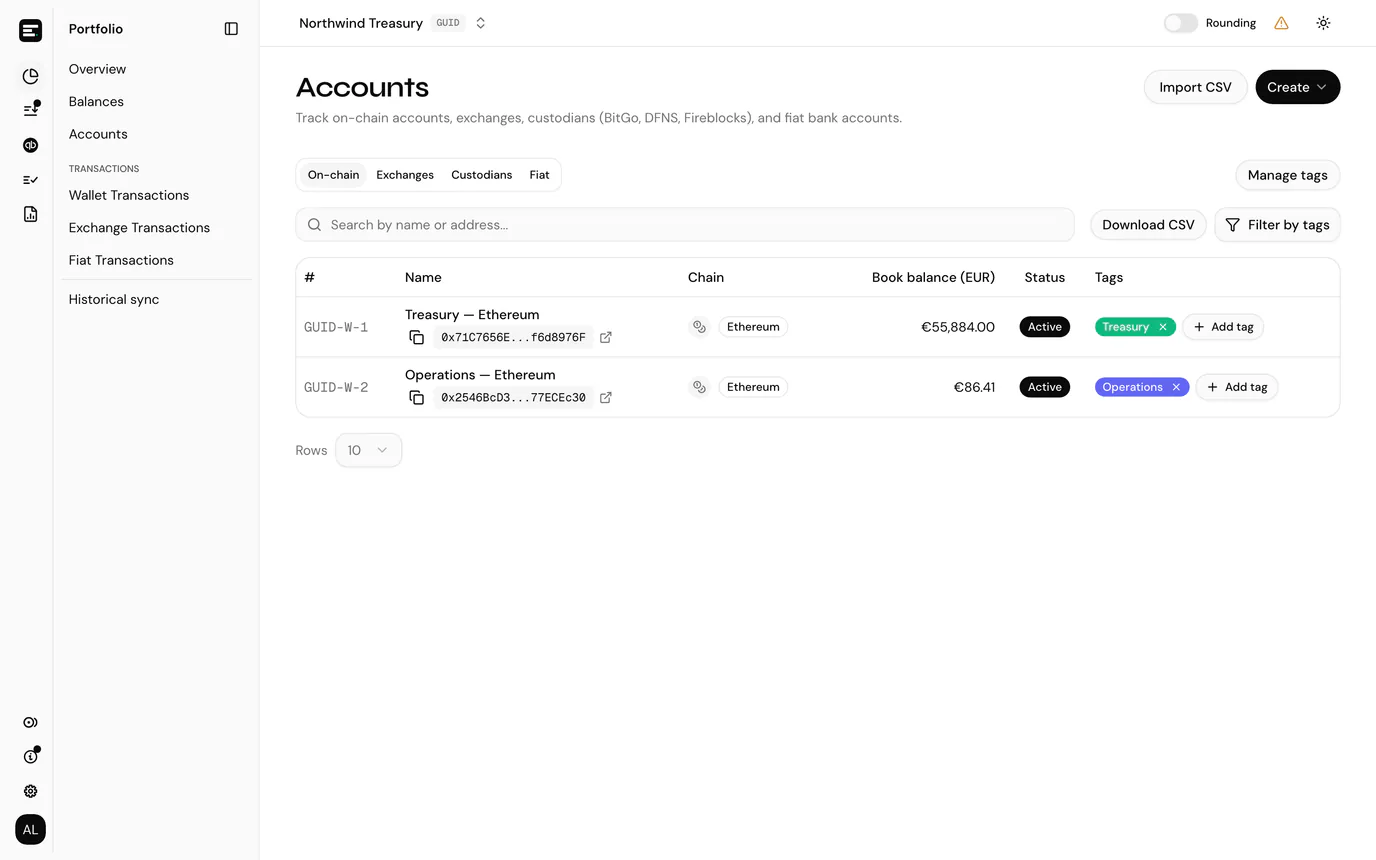
The list has a tab per kind: On-chain, Exchanges, Custodians and Fiat. Tabs for a kind you hold none of still appear, so this is also where you check that an account exists at all.
Accounting entities show each account's Book balance in the entity currency; portfolio entities, which keep no books, leave that column out. The tab, search, tag filter and page you are on are kept in the page address, so going Back to Accounts from an account returns you to the same view rather than the top of the first tab.
Create the account
Select Create, then On-chain. The same button offers Exchange, Custodian and Fiat account, and Import CSV beside it takes a list of addresses at once.
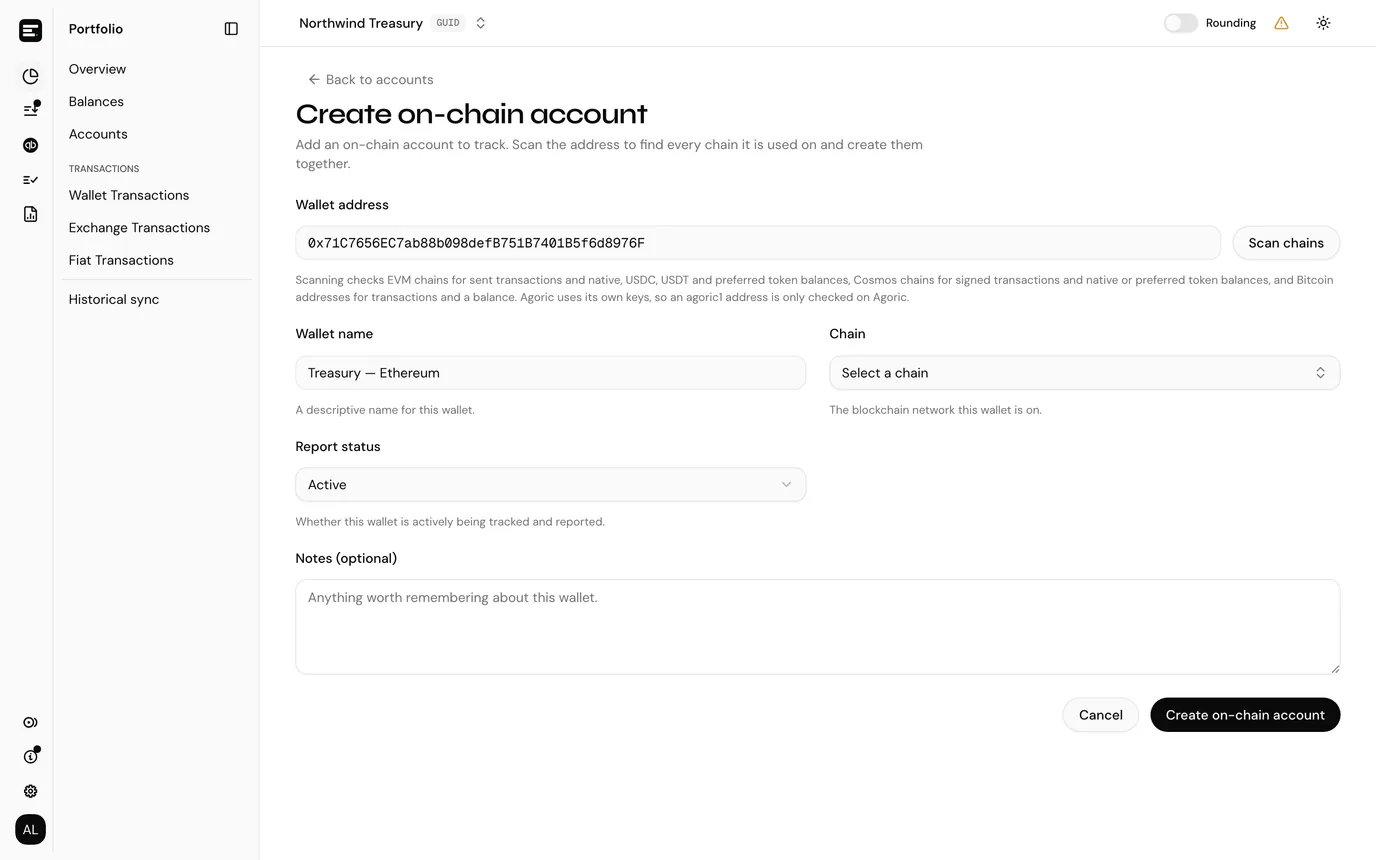
| Field | Notes |
|---|---|
| Wallet address | The blockchain address, up to 255 characters. Paste it rather than typing it. |
| Wallet name | A descriptive name, up to 100 characters. This is what you will see throughout the app, so make it meaningful, for example Treasury Ethereum rather than Wallet 1. |
| Chain | The network this address is on. Offered when you create on a single chain, and replaced by the scan results when you do not. |
| Report status | Active includes the account in reports; Inactive keeps it on record but leaves it out. |
| Notes | Optional free text, shown on the account details page. Anything worth remembering about the account. |
Scan for chains
One address is usually used on more than one network, and creating it a chain at a time is the slow way round. Scan chains checks the address and offers everything it finds.
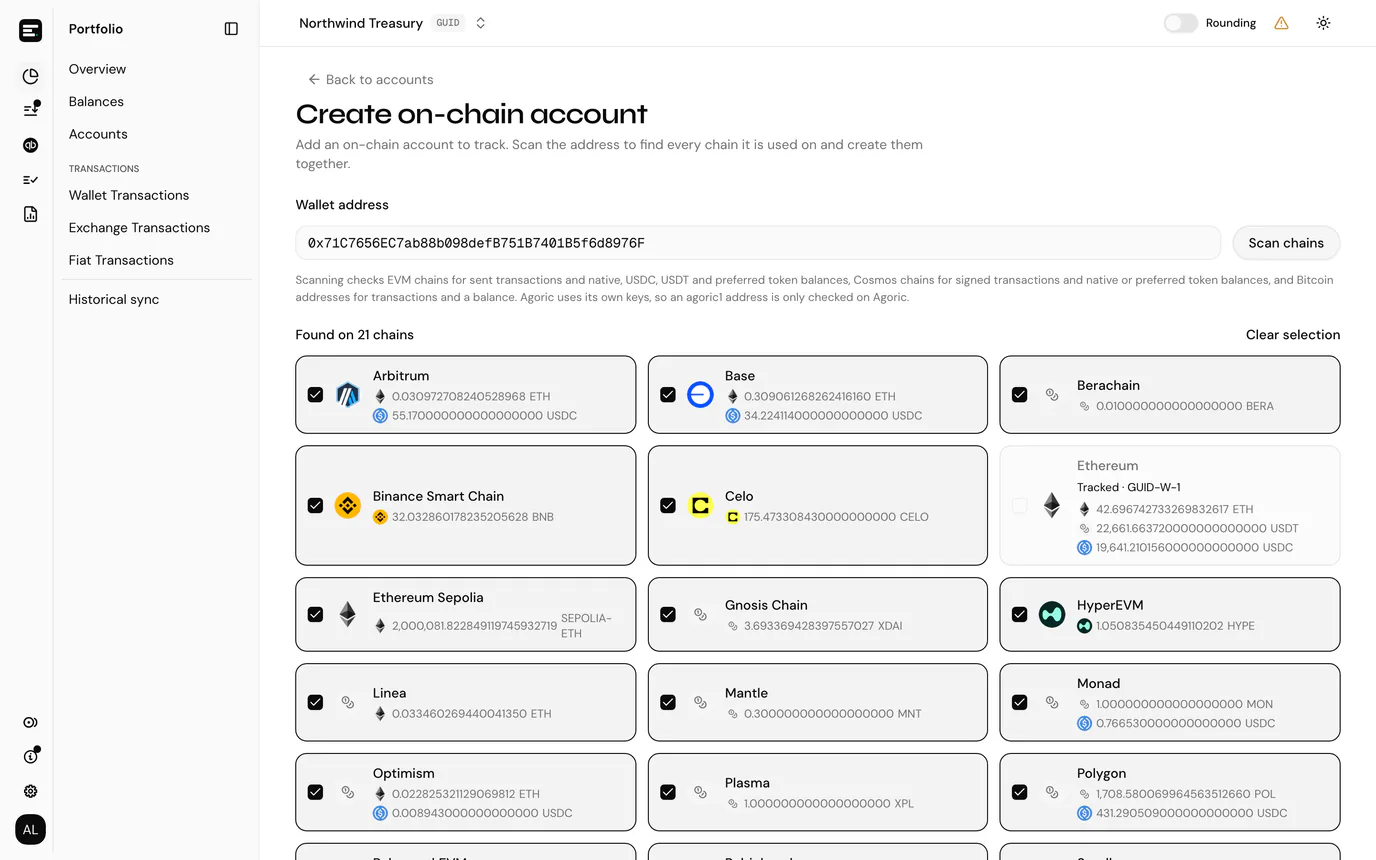
The scan checks:
- EVM chains for sent transactions and balances of the native token, USDC, USDT and your tracked tokens
- Cosmos chains for signed transactions and balances of the native token and your tracked tokens
- Bitcoin for transactions and a balance
It becomes available once the address is a shape that can be scanned: 0x followed by 40 hex characters, a bech32 address such as cosmos1… or bc1…, or a legacy Bitcoin address starting with 1 or 3.
Each chain found is a tile you can tick, with Select all and Clear selection above them:
- Chains with activity and the address's own chain start ticked.
- Chains you already track are greyed out and read Tracked · GUID-W-3, linking to the account that already exists.
- On a Cosmos key, each tile shows the address as it is written on that chain, since one key has a different prefix per network.
- Each tile lists the tokens found there with a balance, amount and symbol, so you can see what an account on that chain would hold before creating it.
A count of chains that could not be checked appears below where any failed. Those chains were unreachable, not proven empty.
With chains ticked, the form changes to match: Wallet name becomes Wallet name prefix, the chain picker disappears, and the button reads Create 6 accounts. The chain name is appended to the prefix per account, so Treasury creates Treasury Ethereum, Treasury Base and so on. A prefix ending in a space or an underscore is used as-is, which is how you get Treasury_Ethereum.
Agoric is scanned alone
Agoric uses its own key scheme, so an agoric1 address is only ever checked on Agoric. Everything else bech32 is checked across the Cosmos chains.
Create on one chain
Nothing obliges you to scan. Leave the chains unticked, or skip the scan entirely, pick a Chain and select Create on-chain account.
This is the route for an address the scan found nothing for. No activity found for this address. Choose a chain below. is not a refusal: a freshly funded address has no history to find, and creating it by hand is correct.
The new account appears in the list and transaction syncing begins. Its balances then show up in Portfolio.
Portfolio entities get their token cards automatically
In a portfolio entity, the confirmation adds Token cards for its balances and your tracked tokens are being added. Each new account gets a card for its chain's native token, for every tracked token, and for anything else the scan found a balance for, and each card shows its current balance as soon as it is fetched. In an accounting entity you create the cards yourself.
Common problems
The address is rejected. The address is checked against the chain before anything is saved, and Please enter a valid wallet address for this chain means it cannot belong to the network you picked. On an EVM chain that means exactly 0x followed by 40 hex characters. The usual cause is a truncated paste: addresses copied from block explorers are sometimes shortened for display (0x71C7…976F), and you need the full value.
"Scan chains" stays greyed out. The address is not yet a shape worth scanning. Check it pasted in full.
"A wallet with this address already exists on this chain". The address is already tracked by this entity on that chain. After a scan you would have seen it as Tracked rather than as an option, so this is a chain picked by hand. Look for it under the On-chain tab, including archived accounts, rather than adding a second copy, which would double up its history.
"Some accounts were not created". A bulk create reports per chain, and the ones that worked are already created. The alert lists each chain with its reason, and the remaining chains stay ticked so you can fix and retry without starting over.
No transactions appear. Confirm the chain matches the address. An account only ever syncs the chain it was created on; an address used on several networks needs an account on each, which is what the scan is for.
Next
Import accounts from CSV if you have a list of addresses rather than one, connect an exchange if you also hold assets on a centralised exchange, connect a custodian for BitGo, DFNS or Fireblocks, or add a fiat account for a bank account. In an accounting entity, the account then needs a token card per token it holds before anything can be posted against it.