
Audit trail
The audit trail is the entity's change log. Every insert, update and delete against the records that matter is written here with who did it and when, and the before and after values are kept so you can see exactly what moved.
Select Reporting in the sidebar's icon rail, then Audit Trail.
It is read-only. Nothing in it can be edited or removed, including by an owner.
Accounting entities only
The audit trail is available in accounting entities only. A portfolio entity has no audit trail, and opening its address redirects you away. See portfolio or accounting.
Admins and owners only
Users, viewers and guests cannot reach the audit trail and are redirected to the dashboard if they try.
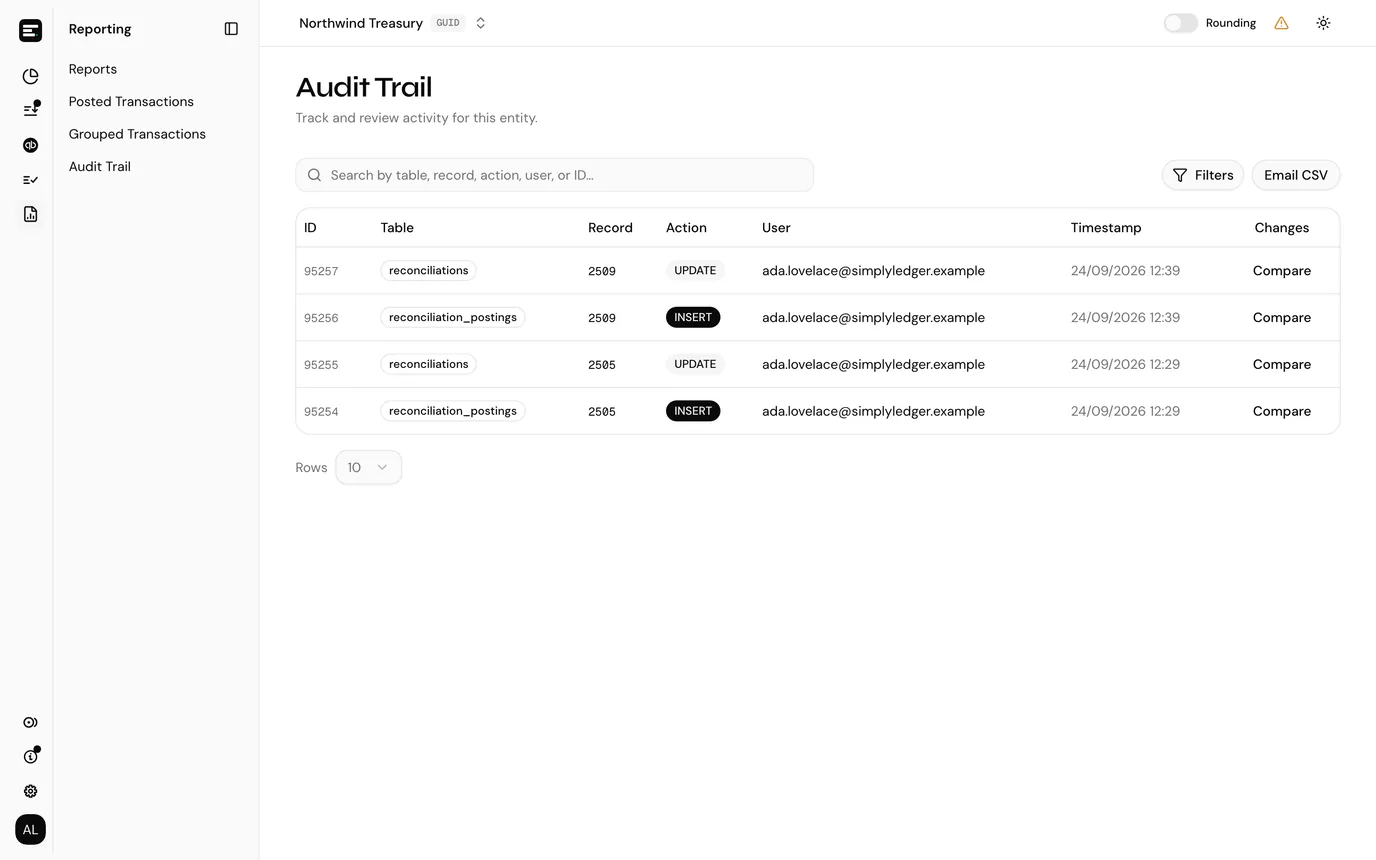
Reading the table
| Column | What it holds |
|---|---|
| ID | The audit event's own number. Useful when quoting an event on a support ticket. |
| Table | Which kind of record changed, for example postings or token_cards. |
| Record | The primary key of the row that changed, so several events against the same record line up. |
| Action | INSERT, UPDATE or DELETE. |
| User | The email address of whoever made the change. |
| Timestamp | When it happened. |
| Changes | Compare opens the before and after. |
Events are newest first, and the page size is set at the bottom of the table.
Filtering and searching
The search box above the table matches across table, record, action, user and ID at once, and is the fastest way to trace a single record's history: paste its ID and you get every event against it.
Filters opens a panel on the right with four narrower controls. The button carries a count of how many are active.
| Filter | Options |
|---|---|
| Table | wallets, users, tokens, chains, token_addresses, token_cards, price_sources, reconciliations, reconciliation_postings, postings |
| User | Any current member of the entity, by email. |
| Date | A single day. |
| Action | INSERT, UPDATE or DELETE. |
Filters combine, so postings changed by one colleague on one day is four selections. Reset clears them all.
Only these tables are audited
The Table filter is the full list of what the audit trail covers. Changes to records outside it, entity settings for instance, are not recorded here.
Comparing changes
Compare on a row opens the event's data side by side.
- On an UPDATE, only the fields that actually changed are listed, each with its old and new value. An update that touched nothing shows No fields changed.
- On an INSERT you see the row as created, and on a DELETE the row as it was before it went.
- An empty value reads as
—, and an empty string as"", so you can tell the two apart.
Field names are the database's rather than the labels on screen, which is what makes an event unambiguous when the same concept appears on more than one page.
Exporting
Email CSV exports every event matching your search and filters, not only the page you are looking at, so there is no need to raise the page size first. The dialog names the address on your account; select Send and the file is generated in the background and emailed to you when it is ready.
Narrow with the filters before sending if you only need a slice, such as one table or one day.
Common problems
"No audit events yet". The entity has had nothing audited yet, or your filters exclude everything. The empty state tells you which: it reads No matching audit events when filters are active.
A colleague's change is not listed. Check the table is one of the audited ones above, and that the User filter is not still set to somebody else.
Next
Roles and permissions covers who can reach this page.