
Roles and permissions
Everyone who works in an entity holds one of five roles. The role decides two separate things: whether you can change anything, and which sections you can reach at all.
Roles are set per entity. The same person can be an admin of one entity and a guest in another.
The five roles
Owner: whoever creates the entity. There is exactly one, it is assigned automatically, and it cannot be handed to someone else or changed to another role. Owners have complete access.
Admin: everything an owner can do in day-to-day use: full read and write, plus team management, entity settings and the audit trail.
User: full read and write across every section, but no access to team management, entity settings or the audit trail.
Viewer: read-only across the whole entity. Every section is visible; any attempt to create, edit or delete is refused.
Guest: read-only and restricted to a handful of sections. The narrowest role, intended for someone who should see holdings and activity but nothing else.
What each role can do
| Owner | Admin | User | Viewer | Guest | |
|---|---|---|---|---|---|
| Entity dashboard | Yes | Yes | Yes | Yes | Yes |
| View all sections | Yes | Yes | Yes | Yes | Limited |
| Create, edit and delete | Yes | Yes | Yes | No | No |
| Invite members and change roles | Yes | Yes | No | No | No |
| Entity settings | Yes | Yes | No | No | No |
| Reports | Yes | Yes | Yes | Yes | No |
| Audit trail | Yes | Yes | No | No | No |
The entity dashboard is deliberately open to everyone, including viewers and guests, so every member has somewhere to land.
Reports and the audit trail sit under Reporting in the sidebar, an area only accounting entities have. In a portfolio entity nobody gets them, whatever their role, and the same goes for cost basis.
What guests can see
A guest can open the entity dashboard and these pages, nothing else:
- Portfolio Overview (and the pages under it)
- Balances
- Accounts, including each account's detail page
- Token Cards
- Transactions: wallet, exchange, fiat and custodian
Their sidebar is a single list with only a Portfolio group holding those pages; guests never get the icon rail. In an accounting entity the token cards list keeps its portfolio name, Token Cards, rather than Balance Sheet. Historical sync, every accounting page, Reporting, Supported Tokens, Support and Settings are all left out.
Opening any other page directly sends a guest back to the entity's home page: the dashboard in an accounting entity, the portfolio overview in a portfolio entity. Requests the app makes for anything else are refused with "Guest access is limited to wallets, portfolio, balances, token cards, and transactions".
On the pages they can open, guests see the same thing as a viewer: everything is readable and nothing can be changed. The dashboard hides the QuickBooks status strip from them.
Note this is narrower than a viewer. A viewer sees every section but cannot change anything; a guest sees only the pages above.
Read-only roles in practice
Viewers and guests can open pages, filter, sort and read detail. What they cannot do is submit anything: creating an account, posting a transaction, editing a reconciliation and so on all fail with a view only error. Buttons that would change data are generally hidden rather than shown and rejected.
Managing your team
Team management lives on the Team page of entity settings: select Settings in the sidebar's icon rail, then Entity → Team. Only owners and admins see the Entity pages or can open them.
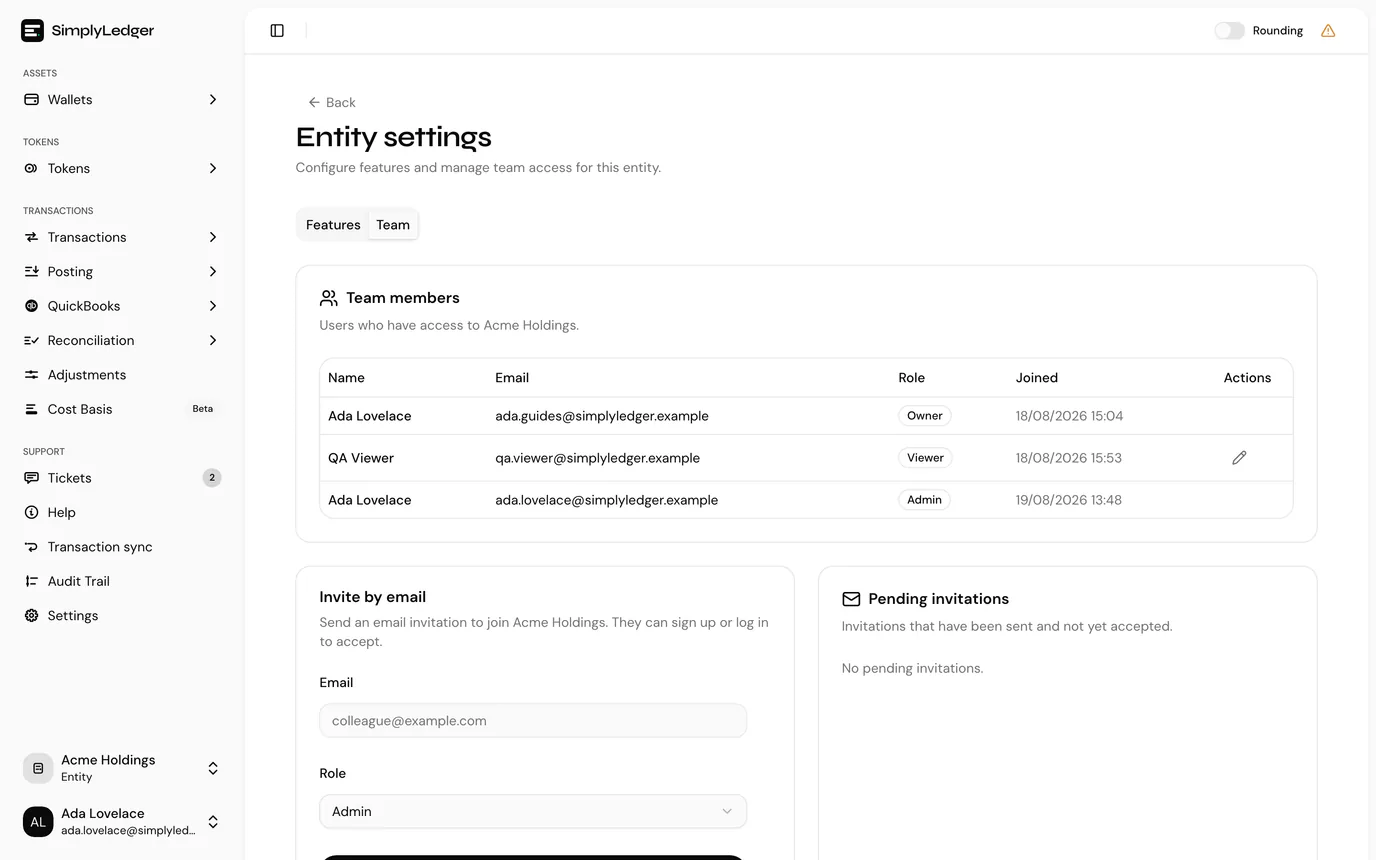
From there you can:
- Invite someone by email, choosing the role they join with
- Change an existing member's role
- Cancel a pending invitation, only while it is still pending
There is no way to remove a member once they have joined. If someone should no longer have access, change their role down. Guest is the narrowest, leaving them only Portfolio, Balances, Accounts, Token cards and Transactions.
Four rules constrain this, and the product enforces all of them:
| Rule | Why you will hit it |
|---|---|
| Owner cannot be assigned | Only Admin, User, Viewer and Guest can be given out. Ownership comes from creating the entity. |
| An owner's role cannot be changed | Not by an admin, and not by the owner. |
| You cannot change your own role | This prevents an admin from locking themselves out or promoting themselves. |
| Only pending invitations can be cancelled | Once an invitation is accepted it is no longer an invitation; see below. |
Choosing a role
Admin for anyone who needs to run the entity: adding people, changing settings, reviewing the audit trail.
User for the people doing the actual work. It is the right default for a colleague who posts and reconciles but should not be changing entity configuration or team membership.
Viewer for an auditor or reviewer who needs the full picture but must not alter it.
Guest for an outside party: someone who should see accounts and balances without any view of your postings, reconciliations or accounting integrations.
Next
In an accounting entity, connect QuickBooks before you start posting. Otherwise go straight to adding an account.