
Token card detail
Open a card from the token cards list, from its account's page, or from a reconciliation. The detail page is where a single card's history lives: what it holds, what it started from, and every posting made against it.
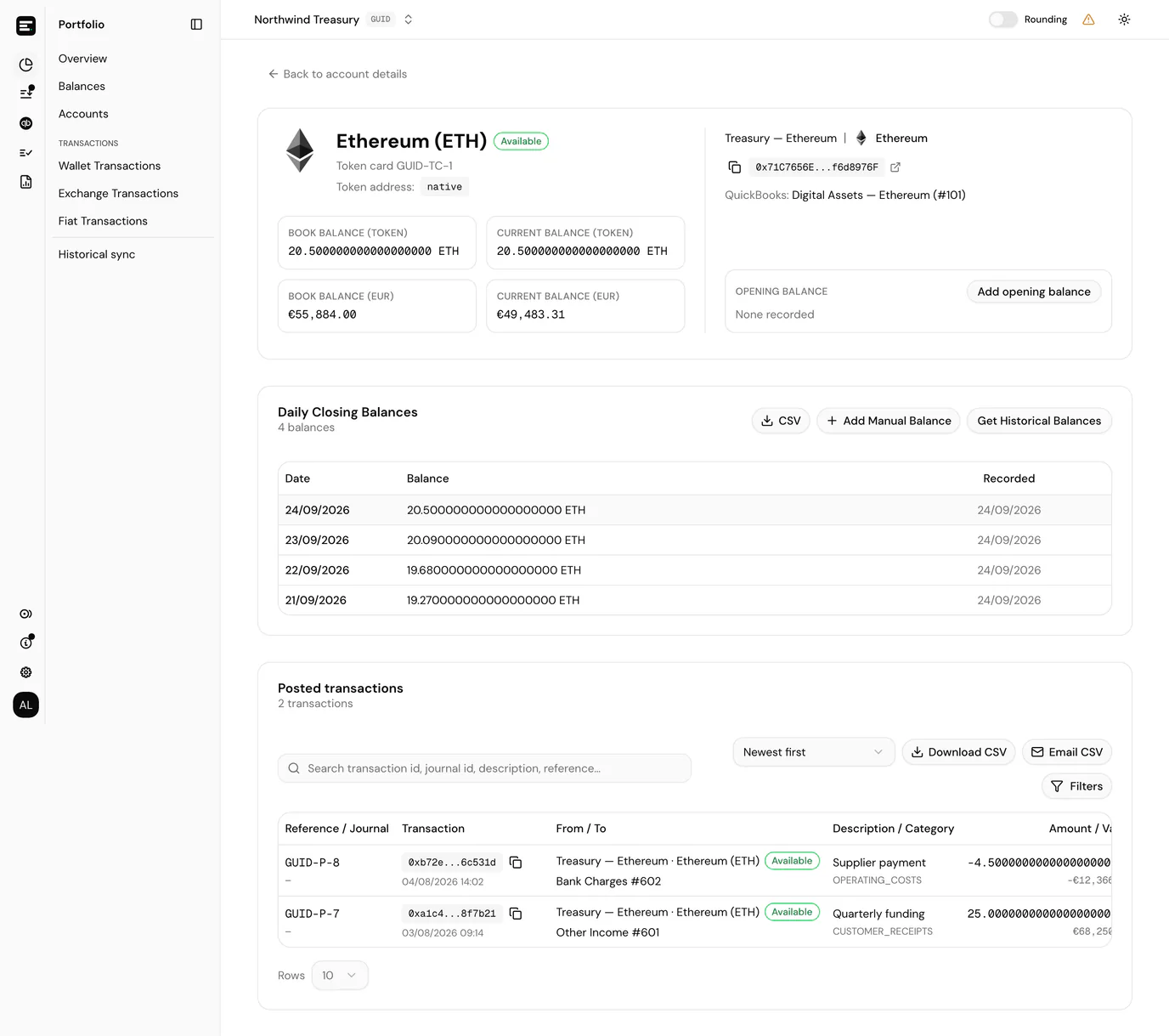
The header
The top of the page carries everything that identifies the card. On the left:
- the token name and symbol as the title, with the holding type badge beside it (see holding types)
- its public reference (for example Token card SVC-TC-1), which is also the ID in the URL
- the token address, or Native for a chain's own coin
- the delegation protocol on a delegated card, with Set delegation protocol when one is still needed, and a stablecoin badge where it applies
- the balances, as a token amount and as a value in the entity currency: Current balance, read from the chain or exchange, and in accounting entities the Book balance from the ledger beside it
On the right:
- the account and chain it belongs to, with the account's address and a link to the block explorer
- the linked QuickBooks account, in accounting entities with QuickBooks enabled. A card created while QuickBooks was off reads QuickBooks: not linked instead, with a Link QuickBooks account button; see linking a QuickBooks account later
- the Opening balance, in accounting entities (below)
Fiat cards omit the chain and address; exchange cards omit the address. A card created moments ago may show no current balance until it has been fetched in the background.
Opening balance
Accounting entities show the card's Opening balance as a small summary in the header: the token amount, and beneath it its value in the entity currency, the date it is as at, and the QuickBooks account it was posted against. With QuickBooks enabled, Local only beside the account means the opening balance was not sent to QuickBooks, either because Post opening balance to QuickBooks was switched off or because it has no posting yet. Portfolio entities do not set an opening balance, so it is absent there.
That starting figure is what the first reconciliation measures against.
- None recorded means the card has no opening balance. Add opening balance opens a dialog with the Date, Balance, Price and Value fields, and the Post opening balance to QuickBooks switch when QuickBooks is enabled, described under creating a token card.
- The bin icon deletes the opening balance after a confirmation. It cannot be undone, and a replacement has to be added again from scratch, so be sure before deleting one that reconciliations already rely on.
Both actions need write access to the entity.
Daily balances
The Daily balances table lists the card's closing balance on each day a figure was recorded. How those rows arrive (collection, historical backfill, or manual entry) is covered in balance collection.
From here you can export CSV, add a manual balance, and, on cards whose balance can be read back from a chain, get historical balances for a past range. Balance collection lists the cards that last button is missing from, and why.
Posted transactions
In an accounting entity, Posted transactions lists every ledger entry booked against this card, with the same columns as posted transactions. Use it when a reconciliation disagrees and you want to see what was posted without leaving the card.
Portfolio entities have no postings, so this section is not shown.
When to open this page
- A reconciliation Actual and Calculated figures disagree: walk the posted transactions and daily balances here.
- You need to collect or enter closing balances for a card.
- You are checking whether a card's QuickBooks account or holding type is what you expect before posting.
Next
Balance collection for filling in missing daily figures, or reconciliation for closing a period on this card.