Notification channels
A channel is where balance alerts are sent: a team member's inbox, a Slack channel or a Telegram chat. An alert needs at least one channel, so set one up first.
Channels belong to the entity. Every alert in the entity can send to any of its channels, and one channel can serve many alerts.
Open Portfolio → Notifications. The page is in both portfolio and accounting entities. Owners, admins and users can add and change channels. Viewers see the alerts but not the channel controls, and guests cannot open the page.
Add your first channel
Until the entity has a channel, the page shows Add a channel to get started, with one tile per type:
| Type | Sends to | Button |
|---|---|---|
| A team member's inbox. | Add email | |
| Slack | A Slack channel, via an incoming webhook. | Connect Slack |
| Telegram | A private chat or group, via the SimplyLedger bot. | Connect Telegram |
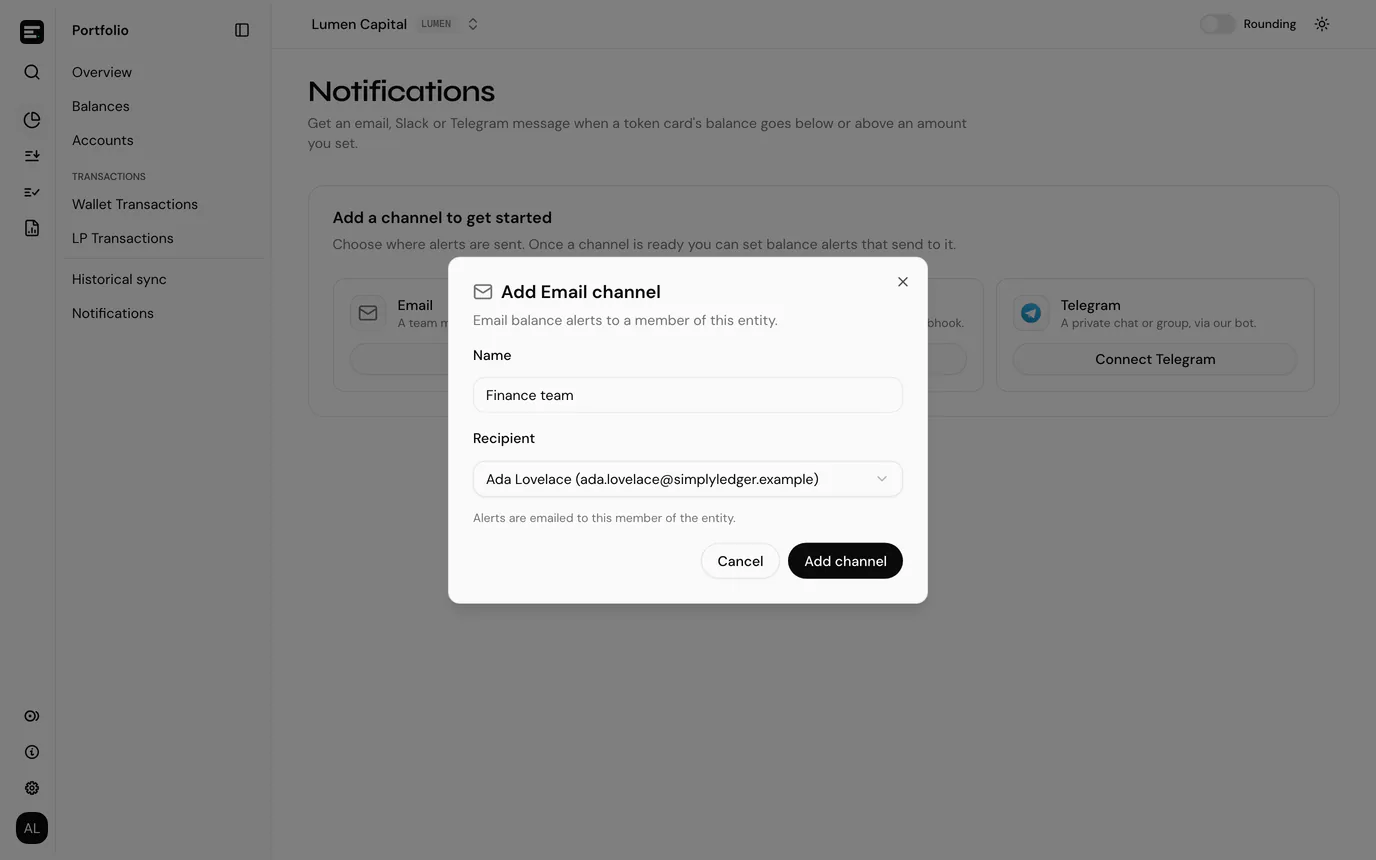
Once there is a channel, add more from Add channel in the page header, which lists the three types. You can also add one from the Notify field while setting an alert; the new channel is then ticked on that alert.
Every channel has a Name of up to 100 characters, which is how it is shown in alert pickers. Select Add channel to save it.
Email
Pick the Recipient. Owners and admins can choose any member of the entity. Other roles can only add a channel that emails themselves, so the field is filled in with you.
The recipient must stay a member of the entity. Alerts are not emailed to someone who has left it.
Slack
Paste the Incoming webhook URL. It must start with https://hooks.slack.com/.
- In Slack, create an app at api.slack.com/apps.
- Turn on Incoming Webhooks.
- Select Add New Webhook to Workspace and pick the Slack channel.
- Copy the webhook URL into SimplyLedger.
Telegram
A Telegram channel is linked from Telegram itself, so it has a second step.
- Enter a Name and select Add channel. The dialog changes to Connect Telegram.
- Select Open Telegram.
- Press Start in the bot chat to get alerts in a private chat, or add the bot to a group from the same link to alert that group.
- Come back to SimplyLedger. The dialog updates by itself once the chat is linked, with Telegram is connected.
Until it is linked, the channel shows Waiting for Telegram and cannot be sent a test. You can close the dialog and finish later: the channel's row keeps an Open Telegram and press Start link.
Manage channels
Add channel → Manage channels opens Channels, the same tiles with the entity's channels listed under their type. Each channel's ⋯ menu holds:
| Action | What it does |
|---|---|
| Send test | Sends a test message. Check the inbox, Slack channel or Telegram chat; an email can take a minute and may land in spam. If the test fails, the row shows Last test failed. |
| Rename | Changes the channel's name. |
| Delete | Removes the channel after a confirmation, which says how many alerts it is removed from. An alert whose only channel this was notifies nobody until you give it another. |
Next
Set a balance alert on a token card.