
Portfolio
Portfolio is the current picture: what the entity holds right now, how it is split, where it is held, and how the total has moved over time. It reads from account balances rather than postings, so it works the same in portfolio and accounting entities.
In an accounting entity, select Portfolio in the sidebar's icon rail, then Overview. In a portfolio entity it is Overview under Portfolio in the sidebar, and it is also the home page: signing in and switching to the entity both land here, and the entity dashboard is not used.
The page needs at least one account. Until then, an accounting entity offers to add one instead, and a portfolio entity shows the two setup steps below.
Setting up an empty portfolio
A portfolio entity with no accounts yet shows two numbered cards in place of the page:
- Choose your tokens. The tokens every account you add is tracked for, saved with Save tokens. See tracked tokens.
- Add an account. Create and Import CSV, the same buttons as on the accounts list, to add an on-chain account, connect an exchange or import a list of addresses.
Token cards and their balances are set up for you from there, including cards for any other tokens the account already holds, so the page fills in without creating cards by hand.
Two controls that apply to everything
Both sit in the page header and affect everything below them.
Currency. A USD / EUR toggle. It starts on your entity currency and switches the whole page, including the ordering: holdings are sorted by value, so a different currency can produce a different order.
Tags. Accounts can carry tags, and the tag filter narrows the entire page to the tagged accounts. Use it to see one part of the treasury (one desk, one purpose, one custodian group) rather than the whole entity. With a filter active, the empty states say no assets match the selected tags rather than implying you hold nothing.
How the split works
The portfolio is divided in two:
| Shown as | What lands there |
|---|---|
| Cash & Stablecoins | Every token flagged as a stablecoin. |
| Crypto | Everything else. |
The split comes from a single flag on the token: the Stablecoin setting, meaning its value is pegged to a fiat currency. It is not decided per account, per chain, or by the token's symbol, so the same token is treated the same way everywhere in the entity.
A token in the wrong half
If something is grouped wrongly (a stablecoin counted as crypto, or the reverse), the fix is the token's stablecoin flag, not anything on this page. See tokens and addresses.
This one split runs through the whole page: the totals, the token bars and the two holdings tabs are all the same division seen at different resolutions.
Total value
Total value is the current value across all tracked accounts, with the two halves beneath it. Each shows its value and its share of the portfolio to two decimal places. Portfolio over time sits beside it.
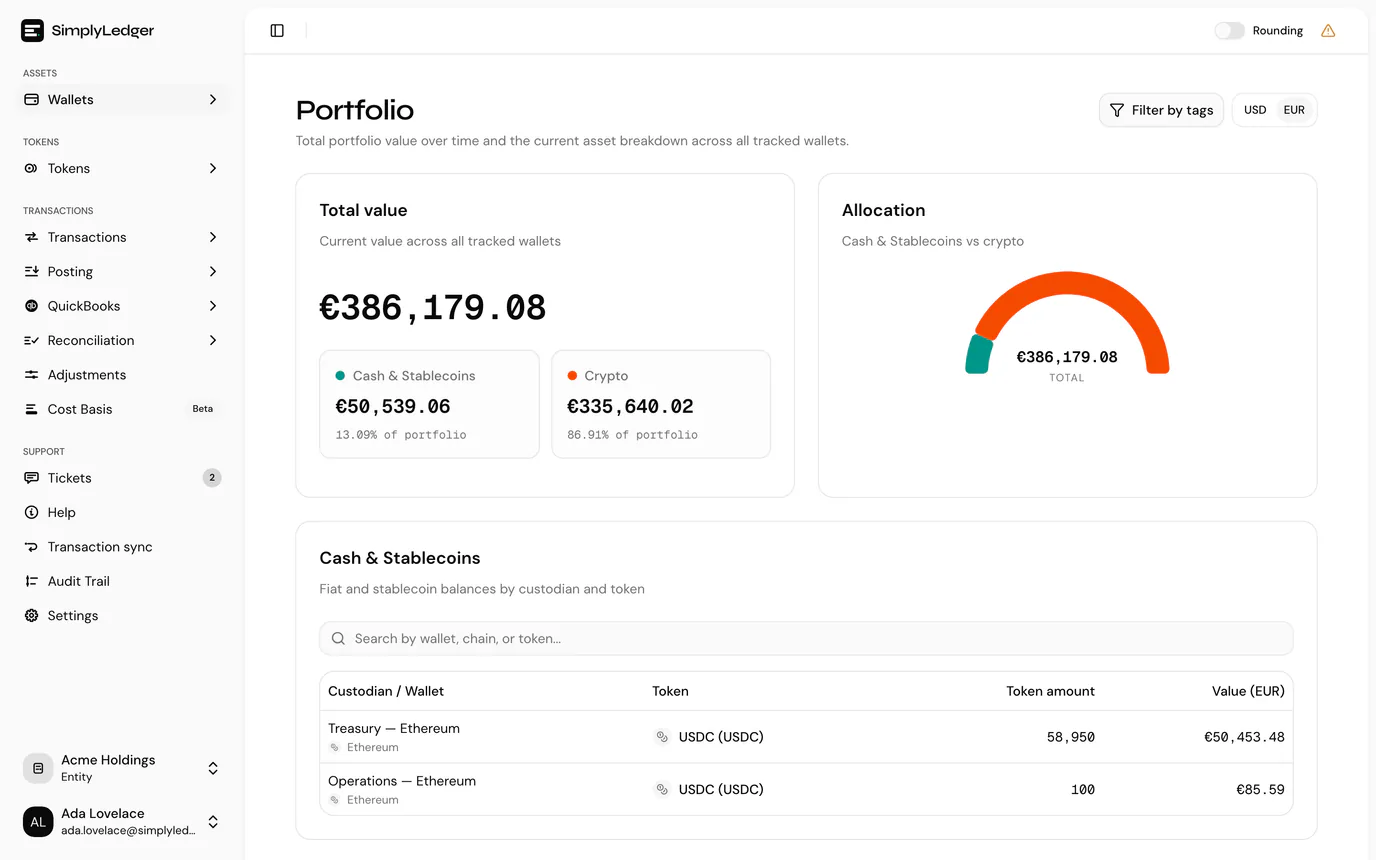
Amounts follow the entity's number format, so the thousands separator and decimal mark match the rest of the app.
The breakdown tabs
Below the totals, a row of tabs breaks the same holdings down in different ways. Only one is shown at a time:
| Tab | Answers | Shown when |
|---|---|---|
| Token distribution | How much of the portfolio is each token | Always |
| Holding types | How much is available, delegated or unclaimed | Always |
| Cash & Stablecoins | Where the stablecoins are held | Always |
| Crypto | Where everything else is held | Always |
| Fiat | How much is in each bank account | The entity holds a fiat account |
| Exchanges | How much is on each exchange | The entity has an exchange connected |
| On-chain | How much is in each on-chain account | Always |
If a tag filter hides the tab you were on, the page falls back to Token distribution.
Split holding types
The Split holding types switch beside the tabs separates each token by its holding type. With it on, the token distribution, holdings and custodian rows are split into Available, Delegated and Unclaimed rewards, each with a holding type badge, so staked ETH and liquid ETH read as two rows. With it off, which is the default, each wallet and token is one row whatever its holding type.
The switch is not kept: it is off again when you next open the page.
Token distribution
Token distribution breaks the value down by token: one row per token, largest first, with its value, its token amount, and a bar showing its share of the portfolio. Bars are coloured by the same split as above (the legend reads Cash & Stablecoins and Crypto) and are scaled against the largest holding, so a small position is still visible beside a dominant one. Shares under 0.1% read <0.1%.
Large token amounts are abbreviated, such as 1.23M. Hover over one for the exact amount.
The top ten tokens are shown; Show all N tokens expands the list and Show top tokens collapses it again. Unlike the holdings tabs, a token held in several accounts is one row here, so this is the view for how much of the portfolio is ETH.
Holding types
Holding types is a donut chart of portfolio value by holding type: Available, Delegated and Unclaimed rewards. Beside it, each type is listed with its value and share, including types you hold none of. Hover over a slice for its figures.
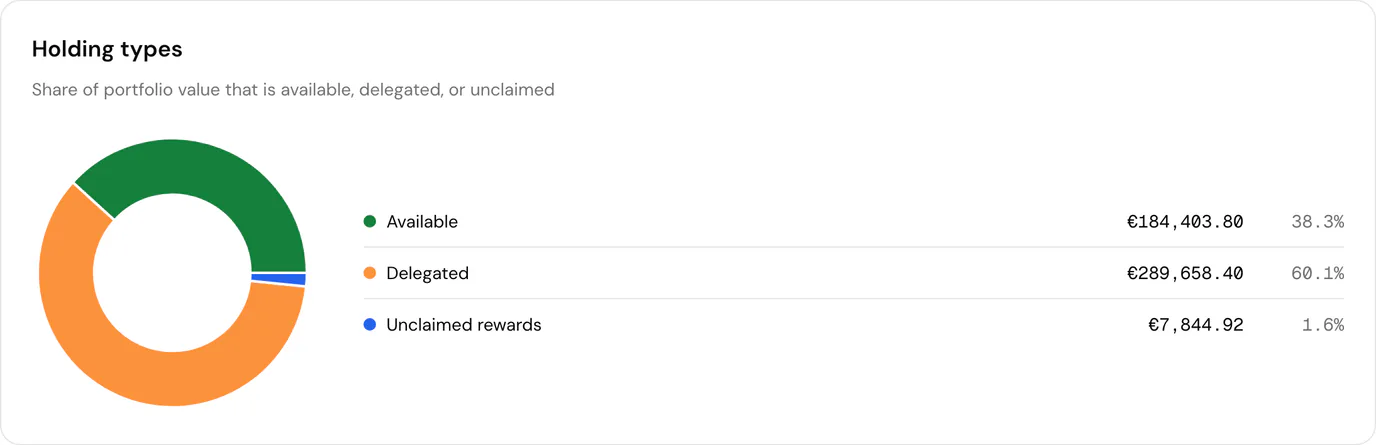
This is the view for how much of the treasury is staked or how much is sitting unclaimed. Holding types are set on each token card, so a figure that looks wrong is fixed there.
Holdings
Cash & Stablecoins and Crypto, one tab per half of the split, each list holdings by custodian and token:
| Column | |
|---|---|
| Custodian / Wallet | The exchange, the bank account, or the on-chain account and its chain. |
| Token | Name and symbol. |
| Holding type | Only with Split holding types on. |
| Token amount | Quantity held. |
| Value | Value in the selected currency. |
Rows are ordered by value, largest first. The same token appears once per account holding it, so USDC across four accounts is four rows. This view answers where is it, not how much in total.
Custodians
Fiat, Exchanges and On-chain regroup the same holdings by who holds them rather than what they are, each ordered by value:
| Tab | Rows |
|---|---|
| Fiat | One per bank account, expanding to the currencies held there. |
| Exchanges | One per exchange, expanding to the tokens held there. |
| On-chain | One per on-chain account (including custodian wallets discovered from BitGo, DFNS or Fireblocks), with its chain, expanding to the tokens held there. |
Cash and crypto are combined here. This is the view for how much is on Binance or how much is in the treasury account, where the split matters less than the custodian.
Portfolio over time
The chart tracks total value across a period.
Under the title, three figures show how the total has moved over the last 24h, 7D and 30D, each as a percentage from that day's close to the latest one, green for up and red for down. They always cover the most recent days, whatever range the chart is showing, and follow the tag filter and the selected view. A dash means there is not yet enough history to compare against.
Three views: Total, On-chain and Exchanges (the last only when an exchange is connected). Splitting the series this way shows whether a movement came from on-chain activity or from an exchange.
Ranges are Last 30 days, Last 90 days (the default), Last year, Year to date, or a custom range.
A new portfolio has no history yet
Balances are recorded at each day's close (00:00 UTC), so a portfolio created today shows No portfolio history yet until the next close has passed. The current figures beside it are already live; only the chart waits.
Next
Balances is the same holdings at a chosen date rather than right now, per token card, and exportable.