
Fiat transactions
Transactions → Fiat Transactions lists the bank statement lines imported against your fiat accounts. It is the cash equivalent of wallet transactions and exchange transactions.
Open it from Portfolio → Transactions → Fiat Transactions in the sidebar. The page is only there once the entity holds at least one fiat account. Nothing arrives here on its own: every row came from a statement CSV somebody uploaded on the account page.
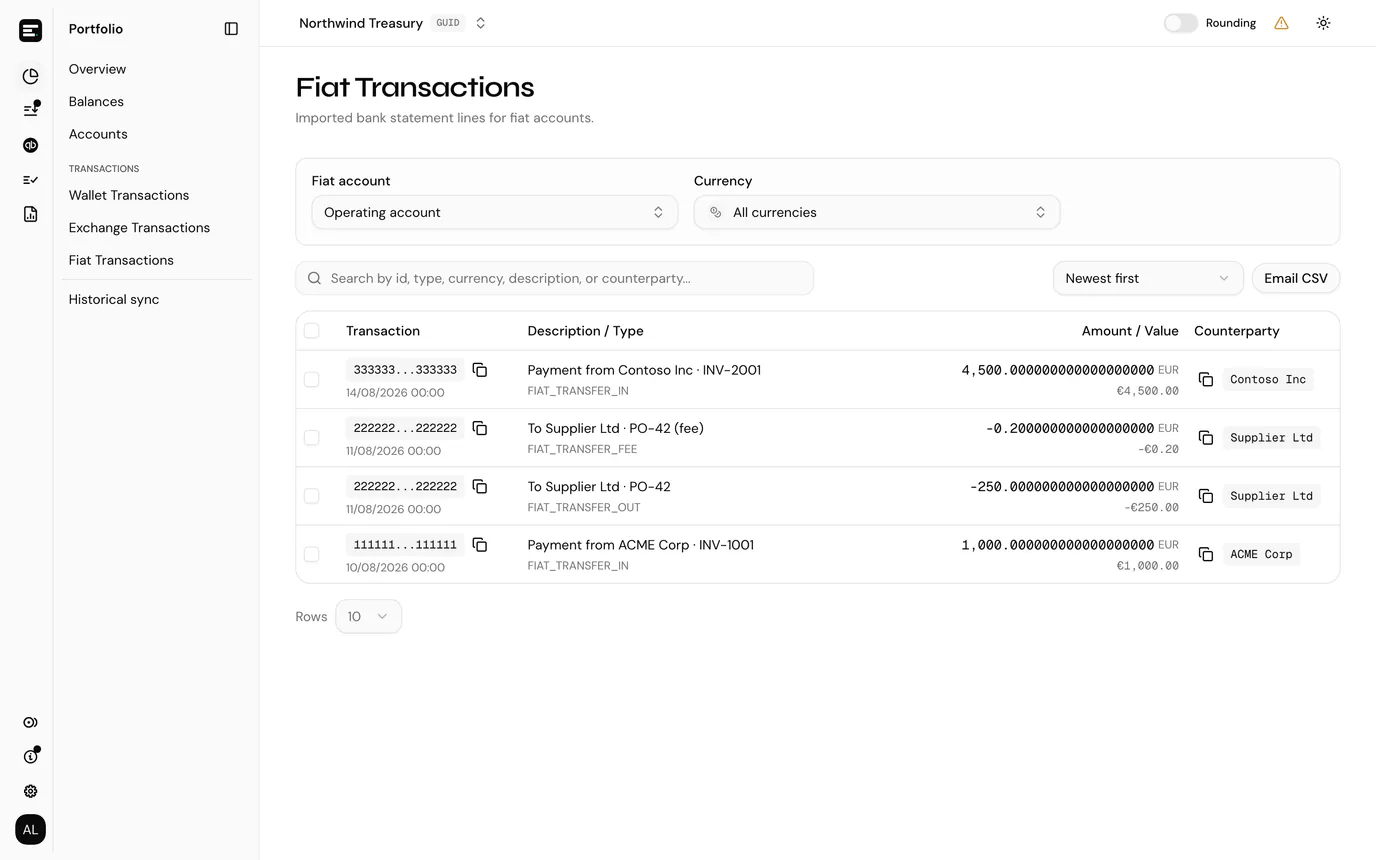
Choose what to look at
| Filter | Notes |
|---|---|
| Fiat account | Required. Nothing is listed until an account is picked, because a statement line only means something against the account it was imported to. |
| Currency | Optional, and only selectable once an account is chosen. The list comes from that account's fiat token cards, so a currency with no card is not offered. |
What the columns mean
Related fields are stacked in one column, as on every transaction table.
| Column | Notes |
|---|---|
| Transaction | The bank's own reference for the line, the ID column of the import, with the date beneath it. The reference is the identity of the row: re-importing the same file updates these rather than duplicating them. The date is the completed date from the statement, or the started date when there was no completed one, in UTC. |
| Description / Type | The statement description, with the reference appended when it adds something; a fee row carries the original description plus (fee). Beneath it the type: FIAT_TRANSFER_IN for money in, FIAT_TRANSFER_OUT for money out, FIAT_TRANSFER_FEE for the fee line. |
| Amount / Value | The amount, signed so negative is money leaving the account, with the Payment currency of the line beside it. Beneath it the value in the entity's currency, from stored token prices for that day. |
| Counterparty | The payer, or the beneficiary name, or the beneficiary IBAN, whichever the export filled in first. |
Sort by, above the table, orders the rows by date, transaction ID, type, currency, amount or description.
Fees are their own row
A statement line carrying a non-zero Fee is imported as two rows on the same transaction ID: the transfer itself, and a FIAT_TRANSFER_FEE row for the fee, always signed as money out whichever sign your bank exported.
That is deliberate. The fee is an expense and the transfer is not, so they post to different categories and are best kept separable.
Posting fiat lines
Imported lines queue for posting like any other transaction, against the fiat account's token card for that currency. At posting time a fiat contra option is labelled EUR · Fiat account · <QuickBooks account> so it is not confused with an exchange or on-chain card holding the same currency.
Period end works the same way too: a fiat account is reconciled per token card. Because there is no chain to read a closing balance from, use Add manual balance on the reconciliation and enter the figure from the bank statement. See when no closing balance was found.
Removing an imported line
A statement line can be taken back out: select the trash icon at the end of the row and confirm. Like everything else that writes, it needs write access, so a viewer or guest sees no icon.
Where the line was already posted, its posting is reverted first and the confirmation says so afterwards, exactly as for transactions added by hand.
Deleting is the right move for a line that should never have been imported: a statement uploaded against the wrong account, or an export that carried rows from outside the period. It is not a way to hide something: because a line's identity is the bank's own transaction ID, importing that statement again brings the row straight back.
Exporting
Email CSV exports every line for the chosen account (and currency, if you picked one) that matches your search, not only the page on screen. The dialog names the address on your account; select Send and the file is emailed to you once it has been generated.
Common problems
The page is not in the sidebar. The entity holds no fiat accounts. Create one.
An account is selected but the list is empty. Either no statement has been imported yet, or the currency filter is narrowing to a card with no lines. Check the import result on the account page: Imported counts what was written.
Amounts are there but Value is blank. There is no stored price for that currency on that date. See token prices.
Next
Post a transaction for what happens to these rows next.