
Categories
A category is how a posting is classified. It is the single choice on a staged row that decides where the entry lands in your books, and two of the things you configure here quietly govern what happens elsewhere: which VAT codes you are allowed to pick, and whether the transaction counts towards cost basis at all.
Select Accounting in the sidebar's icon rail, then Setup → Categories.
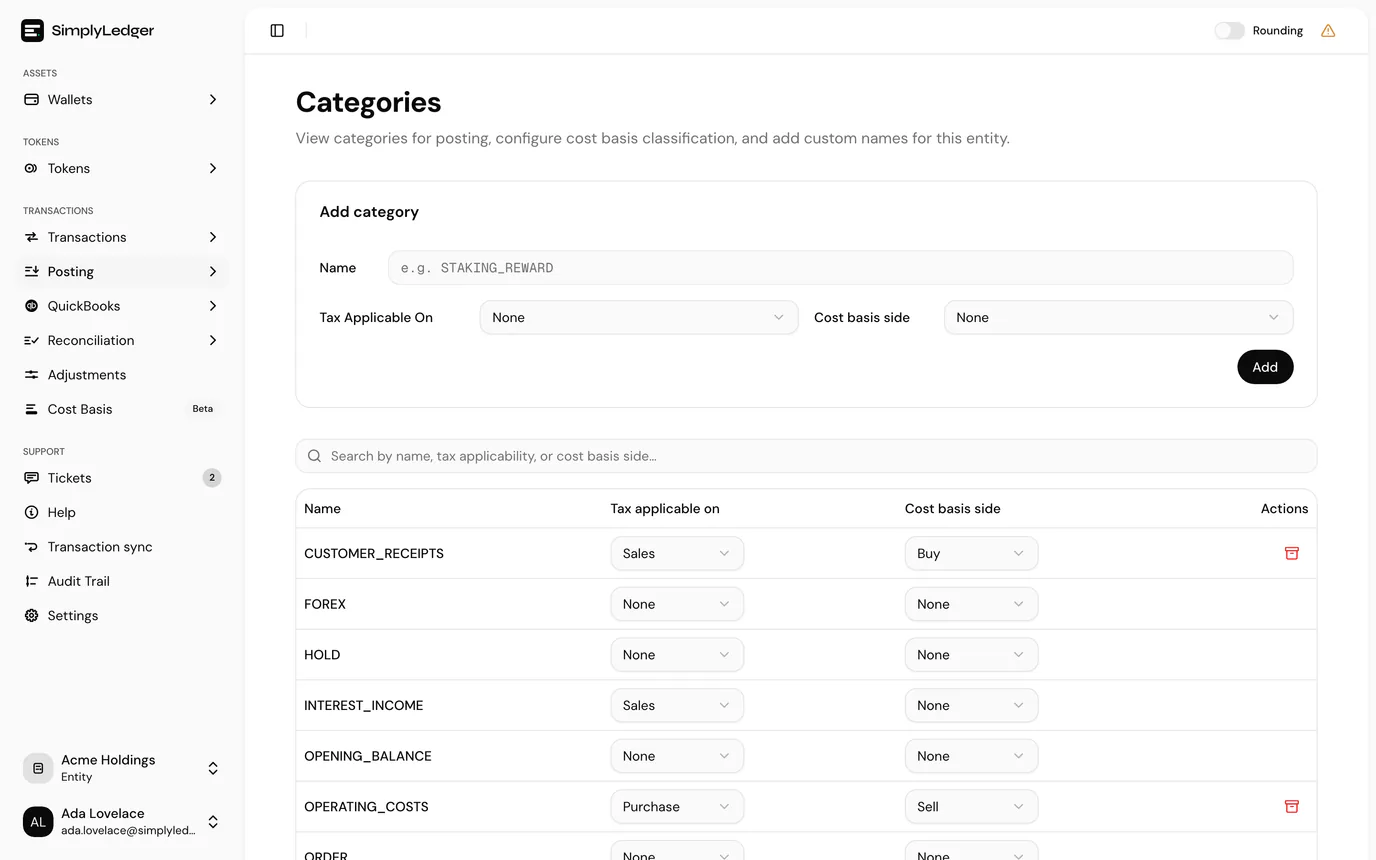
Standard and custom categories
SimplyLedger ships a set of standard categories, and they are the same in every entity. You cannot archive them, but you can change how they behave. The settings below apply to standard categories exactly as they do to your own.
Anything else in the list is a category this entity added.
Adding one
Add category at the top of the page opens a dialog with three fields.
| Field | Notes |
|---|---|
| Name | Uppercase letters and underscores only. The field enforces it as you type, so Staking Reward becomes STAKINGREWARD and you want STAKING_REWARD. A name that already exists is rejected. |
| Tax applicable on | See below. Defaults to None. |
| Use in cost basis | See below. Off by default. |
Confirm with Add category in the dialog. Both settings can also be changed from the table later.
Tax applicable on
None, Sales or Purchase. This controls which VAT codes are offered when posting with the category.
Leave it as None and only the No VAT code is selectable for that category. This is deliberate rather than a fault, and the posting screen marks it with an info icon reading other VAT codes are hidden because this category has no tax applicability configured.
So if a colleague reports that the VAT dropdown has almost nothing in it, this setting is the reason. Set the category to Sales or Purchase and the full list returns.
Use in cost basis
A switch, off or on. It tells cost basis reporting whether postings in the category count at all.
You do not say whether the category is a buy or a sell. That comes from each posting's amount: a positive amount is an acquisition (Buy), a negative one is a disposal (Sell). So one category, such as a swap or a transfer, can carry both directions and each posting is classified correctly.
A category with the switch off leaves its postings showing as uncategorised in cost basis, which means they are absent from gain and loss calculations rather than counted as zero. If you run cost basis at all, every category that moves tokens in or out wants the switch on.
Changing a category
Both settings can be changed straight from the table: Tax applicable on is a dropdown and Use in cost basis a switch, and each saves as soon as you change it; there is no separate save step. The change applies to postings made from that point, so it is worth getting them right before a period's posting rather than during it.
Archiving
Custom categories have an archive action at the end of their row. Standard categories do not.
Archive rather than expecting a delete: postings already made against the category keep their classification.
Who can edit
Adding, changing and archiving categories all need write access to the entity. Viewers see the list with the values as plain text. See roles and permissions.
Where categories are used
| Used by | How |
|---|---|
| Posting | The category set on each staged row. |
| Posting rules | The category a rule fills in automatically. |
| Hold matches | A hold account can be restricted to matching only certain categories. |
| Cost basis | Through Use in cost basis above. |
Next
Posting rules applies categories automatically to transactions that keep recurring.