
Transactions and summaries
Once a token has an opening balance, its cost basis page shows two derived views: the transaction timeline and the period summaries built from it. For the FIFO, LIFO, HIFO and Spec ID types, the token's opening lots are listed above them.
Neither is entered by hand. Both are built from postings, so cost basis is available in accounting entities only; a portfolio entity has no cost basis pages. See portfolio or accounting.
Only reconciled postings count
A posting reaches the cost basis timeline once it belongs to a reconciliation. Postings made but not yet reconciled are absent entirely, so a token whose period has not been reconciled shows an empty timeline and no summaries, however much has been posted against it.
Among reconciled postings, only those whose category has Use in cost basis switched on are counted. A positive amount is a buy, a negative one a sell. Exchange activity is included once it has been posted, and each row's value is the value that was posted.
If a figure looks wrong here, the cause is upstream: what was posted, or how its category is configured.
Period summaries
Grouped by the period on the opening balance, monthly or yearly. Each column's unit (the token symbol or your entity currency) sits in a small second line under its header.
| Column | What it is |
|---|---|
| Period | The month or year. |
| Pool | Quantity held at the close of the period. |
| Avg price | The pool's average cost per token. |
| Total cost | What the pool cost in total. |
| Sold | Quantity disposed of during the period, including tokens spent on fees. |
| Acq. cost sold | What that disposed quantity originally cost, determined by the cost basis type. |
| Sale proceeds | What the sales brought in. |
| Fees paid | The value of tokens spent on fees (a posting whose category has FEE as one of its underscore-separated words, such as BLOCKCHAIN_FEE or SWAP_FEE). They leave the pool like a sale, but nothing is received for them, so they are kept out of Sale proceeds. |
| Realized PnL | Sale proceeds and fees paid together, less the acquisition cost of what was sold. Under Spec ID, a period with disposals still to identify shows no figure here, only how many are not identified. |
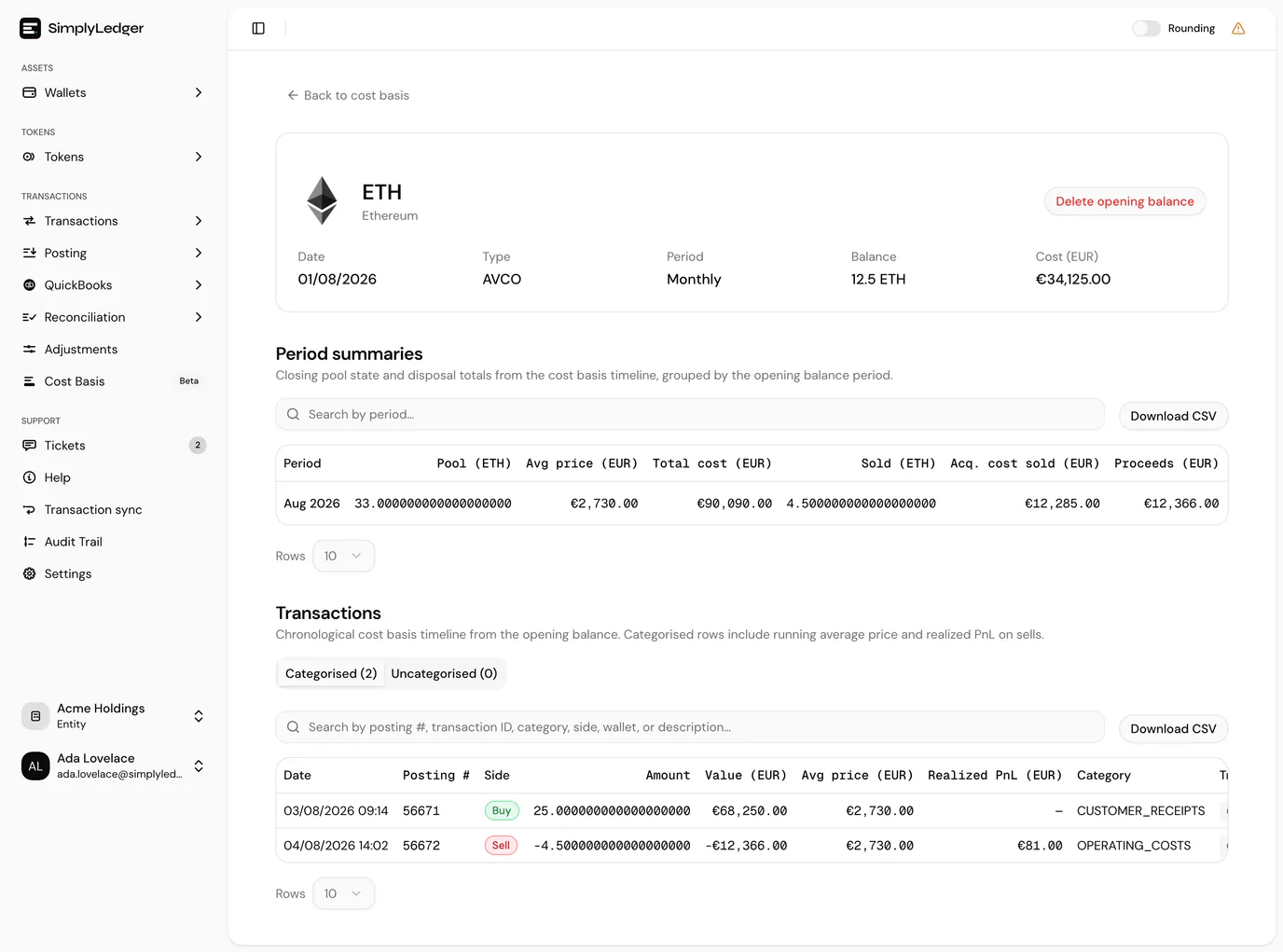
The table sorts, searches by period, and exports to CSV. The CSV carries Sale proceeds and Fees paid as separate columns and also keeps their sum, the Total disposal value.
Overall across all periods
Under the table, Overall across all periods totals the token's whole history:
| Figure | What it is |
|---|---|
| Sold | Quantity disposed of across every period. |
| Acq. cost sold | What all of that originally cost. |
| Sale proceeds | Everything the sales brought in. |
| Fees paid | The value of every token spent on fees. |
| Prior realized PnL | Realised PnL from before the opening date, if you entered any. |
| Overall realized PnL | The realised PnL of every period, plus the prior figure. Green for a gain, red for a loss. |

Under Spec ID, the overall figure is only shown once every disposal is identified. Until then it reads a dash, with how many are not identified underneath.
The transaction timeline
Below the summaries, the chronological timeline the summaries are built from, split into two tabs with counts. Columns hold two lines each, to keep the table narrow.
| Column | What it shows |
|---|---|
| Date | The date and time, with the posting reference underneath. |
| Side | Buy, Sell, or Uncategorized, with the category underneath. |
| Amount | The quantity, with its value in your entity currency underneath. |
| Avg price | The running average price after this row. |
| Realized PnL | The gain or loss on a sell, with the acquisition cost of what was sold underneath. |
| Identification | Spec ID only. The lot identification status of each sell, and Identify. See identifying lots. |
Search covers reference, transaction ID, category, side, wallet and description.
Transaction details
Select a row to open its details in a side panel:
- Amount, Value, Avg price, Acq. cost sold and Realized PnL, plus the Uncovered quantity when the disposal was larger than the pool.
- Identification (Spec ID sells only): the status, the reason when it needs review, and Identify.
- Lots used (FIFO, LIFO, HIFO and Spec ID sells): each lot the disposal drew on, with its acquisition date, label, quantity and cost.
- Category, Wallet, Transaction ID and Description.
Exporting and rounding
Download CSV exports the rows left by the search with every field in full: date, reference, side, amount, value, average price, acquisition cost sold, realised PnL and uncovered quantity, then Lots used for the lot types and Lot identification for Spec ID, then category, transaction ID and description.
The Rounding switch in the page header rounds token amounts on this page (the opening balance, the pool, the quantity sold, each transaction amount and each lot) to 2 decimal places, as it does elsewhere in the app. Values in your entity currency are unaffected, and CSV exports keep amounts at full precision.
A disposal larger than the pool
A warning icon next to a sell's amount means the disposal was larger than everything the pool held at that point. The excess has no acquisition to match against, so it is dropped rather than taking the pool below zero, and that row's realised PnL is overstated by the proceeds of the uncovered quantity. Hover the icon, or open the row, for the quantity involved.
The usual causes are an acquisition that never reached the timeline (an uncategorised posting, see below) or holdings from before the opening date that were not entered as opening lots. The CSV export includes the uncovered quantity for each row.
Categorised and uncategorised
A row is categorised when its category has Use in cost basis switched on. It is then a buy or a sell according to the sign of its amount.
Everything else lands in the Uncategorised tab. Those rows are not treated as zero. They take no part in the calculation at all, so the pool, the average price and every realised gain are computed as though they never happened.
Check this tab before trusting the numbers
A populated Uncategorised tab is the most common reason cost basis figures look wrong. The fix is to switch on Use in cost basis for the categories concerned, under categories; the timeline recomputes from the postings you already have.
Identifying lots (Spec ID)
With the Spec ID type, you decide which lots each disposal sold from. Until you do, SimplyLedger does not guess: an unidentified disposal shows no acquisition cost and no realised PnL, and its period cannot be posted. Every sell on the timeline shows a status in the Identification column:
| Status | Meaning |
|---|---|
| Identified | The lots you chose cover the whole disposal. |
| Not identified | No lots have been chosen yet, so there is no acquisition cost or realised PnL for it. |
| Needs review | A selection exists but no longer fits, for example because a lot it used was deleted. Hover the badge, or open the row, for the reason. |
To identify a disposal, select Identify on its row or in its details. The Identify lots dialog lists only the lots still held immediately before that disposal, since those are all it could have drawn on, with each lot's acquisition date, label, available quantity and unit cost.
- Enter a quantity in Use for each lot the disposal sold from. Fill puts whatever is still needed onto that lot, up to what it holds.
- Watch the badge next to To identify: it shows how much is left or over, and reads Balanced when the quantities add up to the disposal.
- Save selection. It is only available once the selection is balanced and no lot is asked for more than it holds.
Clear selection removes the choice, returning the disposal to Not identified.
If the dialog says the pool held nothing when the disposal happened, the lots it needs are missing: add opening lots, or categorise the acquisitions missing from the timeline.
Who can identify lots
Choosing lots needs write access. Viewers see the statuses without the Identify action.
Posting realised PnL
A period with non-zero realised PnL offers Post realized PnL, which turns the calculated figure into a posting. Under Spec ID, a period with any disposal still to identify reads Identify every disposal to post instead.
The dialog shows what it will create and what it needs:
| Field | Notes |
|---|---|
| Transaction ID | Generated and read-only, in the form REALIZED_PNL:<period>:<token id>. |
| Realized PnL | The figure from the summary. Read-only: this posts the calculation, it does not let you revise it. |
| Period end date | The posting's date: the last day of the period. Read-only. |
| From account and To account | The two QuickBooks accounts the posting moves between. Both required, and they must differ. |
| Category | Required. |
| VAT code | Optional. |
| Description | Prefilled as Realized PnL for <token> <period>, and editable. |
Once posted, the period's action changes to View postings, which opens All postings filtered to the entry that was created.
A period can only be posted once; the dialog refuses a second attempt rather than creating a duplicate.
What this needs
Posting realised PnL needs write access. Viewers see the summaries without the posting action. See roles and permissions.
Next
Categories is where a category is switched into cost basis, which is what puts a transaction on this timeline in the first place.