
Token cards
A token card is one token, in one account, at one holding type. It is the unit SimplyLedger tracks a balance on, posts against, and reconciles.
An account holding ETH and USDC has two token cards. If that account also stakes, its staked ETH is a third card. A fiat account has one card per currency. Nothing about a token can be posted or reconciled until the card exists.
The three pieces
A token card sits on top of two pieces of reference data: the token itself and its address on the account's chain. If either is missing, the card cannot be created. See tokens and addresses.
Where token cards live
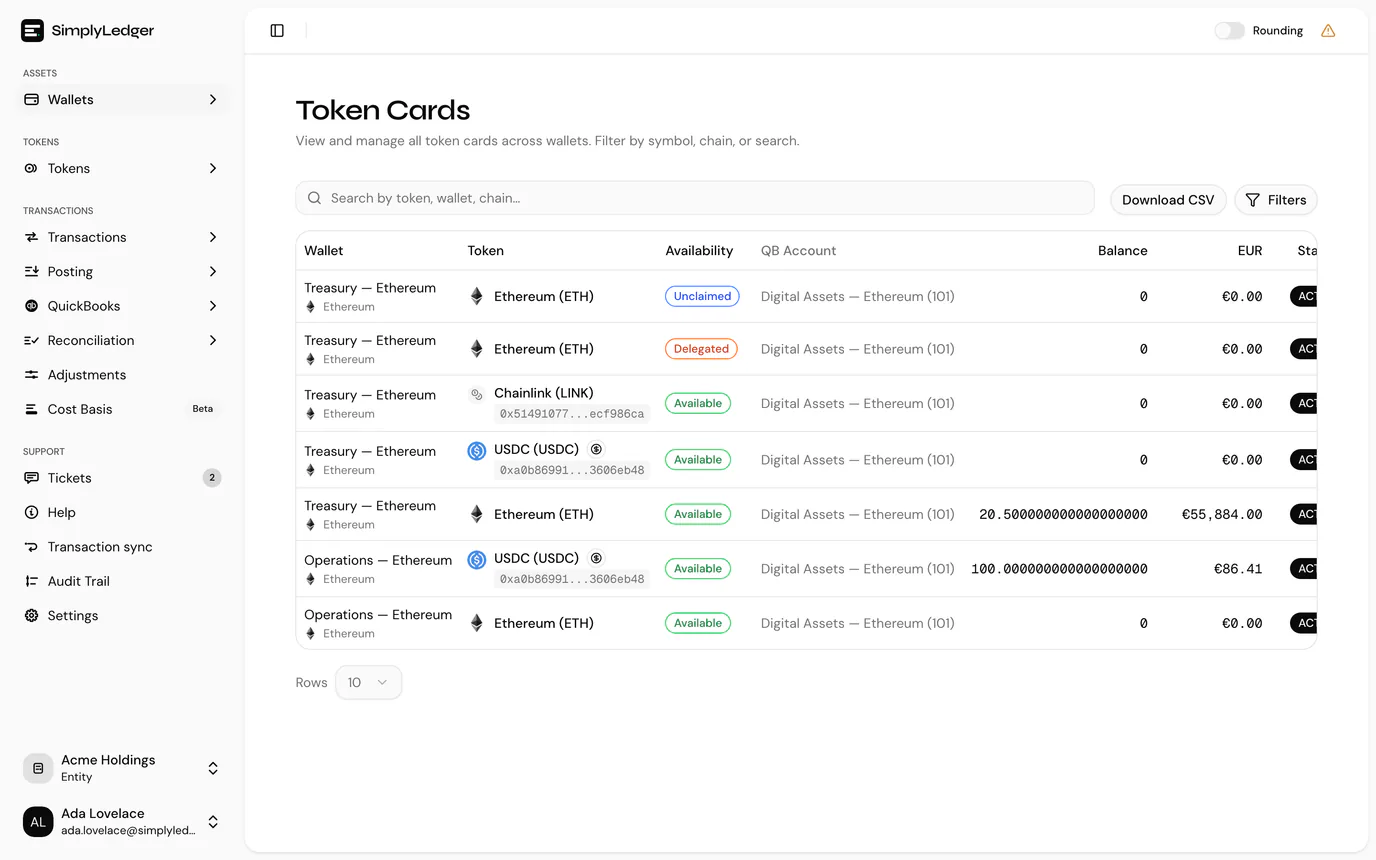
One page lists every card in the entity, across accounts. Where it sits depends on the entity:
- Accounting entity: the page is titled Balance Sheet, because it is where you compare book and current balances and see when each card was last reconciled. Select Reconcile in the sidebar's icon rail, then Balance Sheet under Reconciliations.
- Portfolio entity: the page is titled Token Cards, under Portfolio in the sidebar.
Guests in an accounting entity see it as Token Cards, under Portfolio, because they have no Reconcile area. Viewers see the Balance Sheet like everyone else. It is the same list either way; only the name and the sidebar entry change.
| Column | |
|---|---|
| Token card | The card's public reference, with an Archived badge on an archived card. |
| Wallet | The account and its chain. |
| Token | Name, symbol and token address, with the holding type beneath and, on a delegated card, its delegation protocol (or Protocol needed when one is still to be set). |
| QB Account | The linked QuickBooks account. Only when QuickBooks is enabled. |
| Book balance | The balance from the ledger, as a token amount with its value in the entity currency. Accounting entities only. |
| Current balance | The latest balance read from the chain or exchange, with its value. |
| Last recon | The date of the card's most recent reconciliation, or a dash. Accounting entities only. |
The Wallet, Token and balance columns sort, and so does Last recon, which is the quickest way to find the cards nobody has closed a period for: sort ascending and the never-reconciled ones come first.
Search by token, wallet, chain… narrows the list as you type, and Filters narrows it further:
| Filter | Notes |
|---|---|
| Tags | The account tags to include. A card is listed when its account carries any of the tags picked. |
| Token | One token across every account holding it. |
| Chain | On-chain cards only: exchange and fiat cards have no chain, so this filter excludes them. |
| Holding type | Available, Delegated or Unclaimed rewards. See holding types. |
| Archived | Unarchived (the default), Archived or All. |
| Last recon date | A date range against each card's most recent reconciliation. Accounting entities only. |
| Stablecoins only | A switch. |
| Hide zero value | A switch that drops cards whose current balance is worth nothing, or has not been fetched yet. Portfolio entities only, where tracked tokens can leave many empty cards on accounts that do not hold them. |
The Filters button carries a count of how many are active, so a narrowed list is never mistaken for a short one. The search and filters are also kept in the page address, so opening a card and going Back to token cards returns you to the same narrowed list, and a filtered list can be bookmarked or shared.
Download CSV exports exactly the rows the list is showing, after search and filters. The file has a column each for the holding type, delegation protocol and report status, and gives every balance as both the token amount and the value in the entity currency. Book balance and Last Recon Date are included in accounting entities only.
An account's own page lists just its cards, and is where you create new ones.
In a portfolio entity, cards are created for you
Adding an on-chain account or an exchange to a portfolio entity creates its token cards automatically, from your tracked tokens and what the account already holds. You only create a card by hand for a token that was missed.
Create a token card
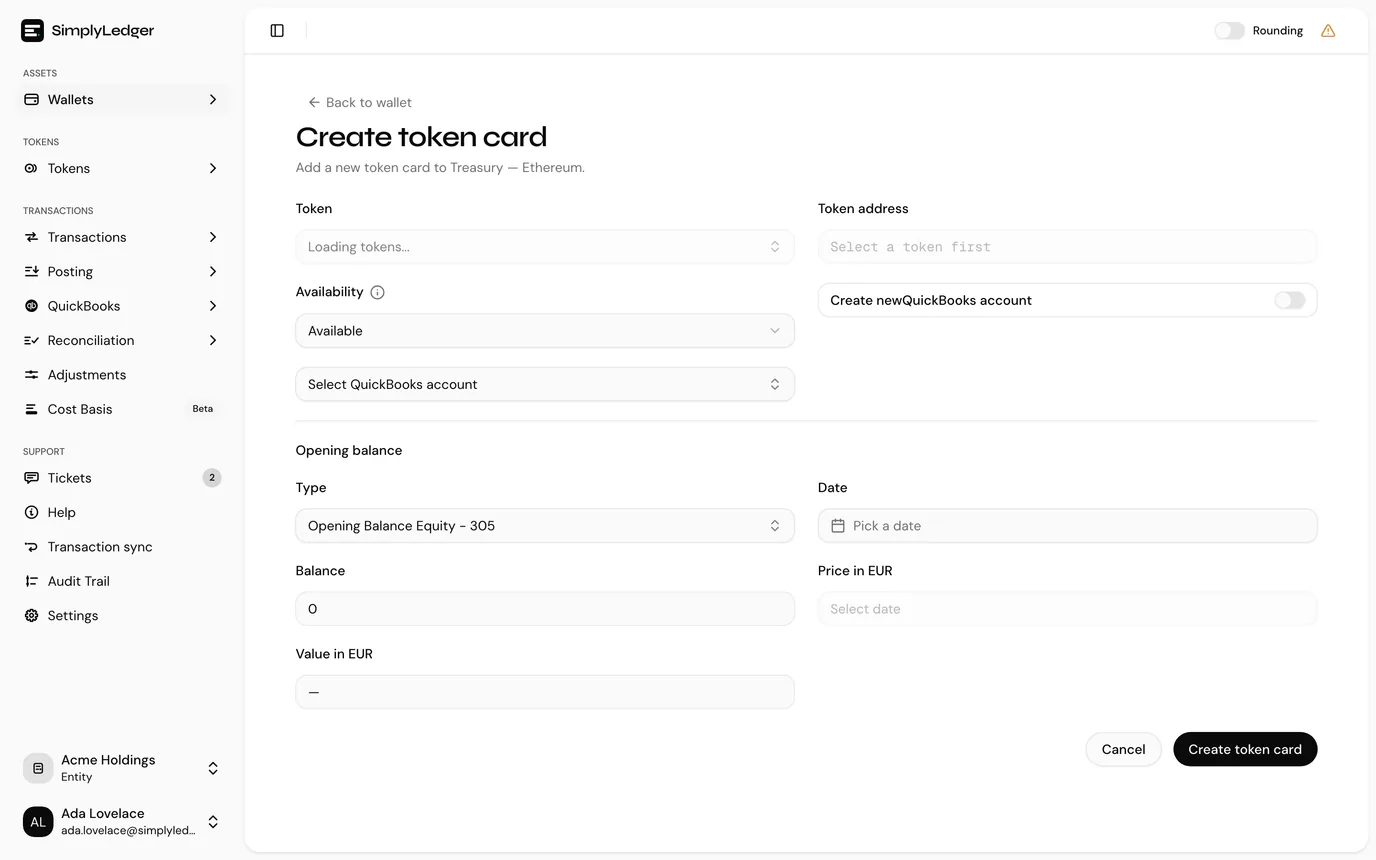
Open the account from Portfolio → Accounts, then select Add token card. The page it opens is titled Create token card, with a summary of the account you are creating on at the top: its type, chain, address and reference, so a card is never created against the wrong account.
Two other routes reach the same form, and both are worth knowing because they carry the token through for you:
- Suggestions on the account page. When synced transactions reference a token the account has no card for, the page offers N tokens found in transactions with an Add button per token. Accounting entities only.
- Posting overview. An account with unpostable activity lists Missing token cards, each with a Create token card button. Accounting entities only.
Fields
| Field | Notes |
|---|---|
| Type | Exchange and fiat accounts only. Token for crypto, Fiat for a currency balance. On-chain accounts are always Token, and a fiat account is always Fiat: a crypto card on one is refused with crypto token cards are not allowed on fiat wallets. |
| Token | Search by name or symbol. If the token is not listed it has not been added yet; see tokens and addresses. |
| Fiat currency | Replaces Token when the type is Fiat. |
| Token address | The token's address on this account's chain. Shown read-only when the token has one address there, and as a picker when it has several. A chain's own coin shows as Native. |
| Holding type | Available, Delegated or Unclaimed rewards. See holding types; it decides which on-chain balance the card tracks. |
| Delegation protocol | Delegated cards only, and only where the token needs one. Which protocol holds the stake. See delegation protocols. |
| QuickBooks account | Which account this card's postings land in. Switch on Create new QuickBooks account to have one made, or pick an existing account. Shown only when QuickBooks is enabled, and required when it is. A card created while QuickBooks was off has none; link one later. |
Opening balance
Accounting entities set an opening balance as part of creating the card. This is the balance the ledger starts from, so every later reconciliation measures against it.
| Field | Notes |
|---|---|
| Opening balance account | The QuickBooks account the opening balance posts against. The list holds only accounts marked for opening balances; Manage opening balance accounts beside the field marks more without leaving the form. See accounts for opening balances. |
| Post opening balance to QuickBooks | A switch, on by default, shown when QuickBooks is enabled. On creates a journal entry in QuickBooks for the opening balance. Turn it off when the balance is already in your QuickBooks books: it is then posted in SimplyLedger only, and the card shows it as Local only. |
| Date | The date the balance is as at. Defaults to 1 January of the current year, which is the usual answer when a book is being opened. Future dates are disabled. |
| Balance | The token amount. Fetch balance reads the actual on-chain balance for this account, token address and holding type as at the day before the date, so you do not have to look it up. |
| Price | The token's price on that date, filled in automatically from token prices and editable if you need to override it. |
| Value | Balance × price, read-only. |
Fetch balance appears only once the token, address, holding type and date are all set, only for on-chain cards, and only on chains that can serve a balance at a past date. On a chain that cannot, the button is not shown and the balance is entered by hand. On a Delegated card it also waits for the delegation protocol, since that is where the staked figure is read from. Exchange and fiat cards are entered by hand.
Portfolio entities have no opening balance step; they track balances without a ledger behind them.
Select Create token card to finish.
Linking a QuickBooks account later
A card created while QuickBooks was switched off has no QuickBooks account, so its postings are not sent to QuickBooks until it gets one. Once QuickBooks is enabled and connected there are three ways to give it one:
- On the card. Its detail page reads QuickBooks: not linked with a Link QuickBooks account button, which opens a dialog to pick one of the entity's imported accounts.
- In bulk (owners and admins). Select Settings in the sidebar's icon rail, then QuickBooks under Entity, and Set up accounts beside Token card QuickBooks accounts. The page, Set up QuickBooks accounts, lists every card without an account. Pick an imported account for each, or leave it on Create new account to have one made, named after the account and token.
- From the dashboard. For owners and admins, an accounting entity's dashboard shows N token card(s) without a QuickBooks account, with Set up accounts leading to the same page.
When the card already has postings, linking asks what should happen to postings made before linking:
| Choice | |
|---|---|
| Send them to QuickBooks | They are sent in batches every 5 minutes once linked. |
| Keep them out of QuickBooks | For postings already in your QuickBooks books. They stay in SimplyLedger, marked Local only. |
The bulk page also offers to post opening balances that have no posting yet: post them and keep them out of QuickBooks (Local only), post them and send them, or leave them without a posting. Balances and reconciliations in SimplyLedger are unaffected whichever you choose.
The link is permanent
Once a card has a QuickBooks account it cannot be changed. Check the account before linking.
Linking needs write access.
What a card shows
Opening a card takes you to its detail page: the account and chain, the token, holding type and delegation protocol, QuickBooks link, book and current balance, opening balance, daily balances and posted transactions. A new card's current balance is fetched in the background, so it may read as empty for a moment before it appears.
Archiving
Archive removes a card from active lists while keeping everything already recorded against it. There is no delete.
Archive a card when the account no longer holds that token and you do not want it in the working list. Its postings, balances and reconciliations stay intact.
Next
Available, delegated and unclaimed rewards explains the holding type, which is the one decision on this form that is hard to undo later.