
Cost basis opening balances
A cost basis opening balance is the starting point of a token's cost basis timeline: how much of it you held on a given date, and what that holding cost. Nothing is calculated for a token until one exists.
Select Reconcile in the sidebar's icon rail, then Cost Basis. The list has a row per token with a Set or Not set badge, the opening date, the type, the period, and the opening balance and cost. For a lot type, the balance and cost are the totals of its opening lots.
Not the same as a token card opening balance
A token card opening balance starts the ledger for one token in one account. This one starts cost basis for a token across the whole entity. They are separate records, set in different places, and one does not create the other.
Creating one
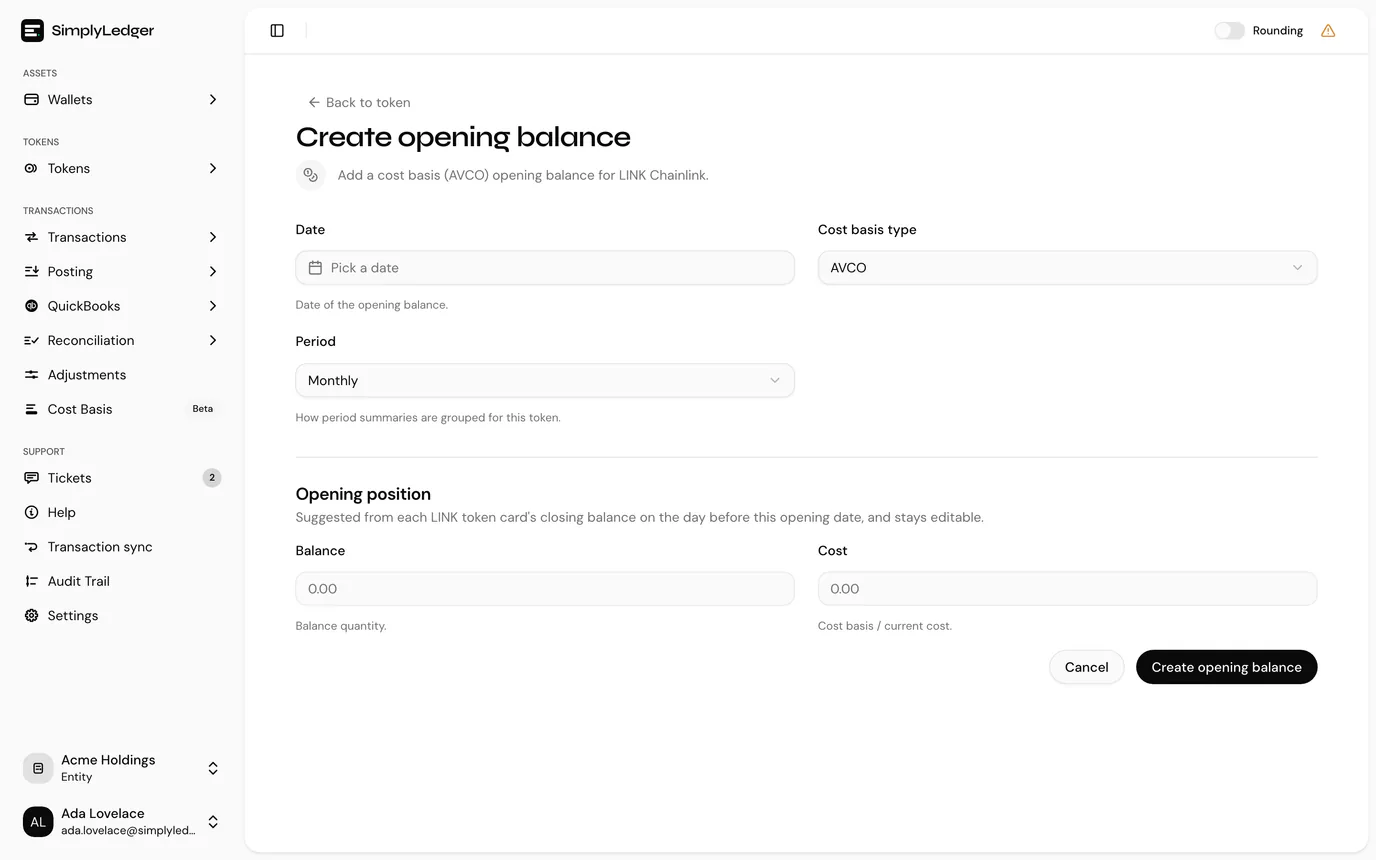
Select a token whose badge reads Not set, and the create form opens directly. (From a token's own page, the same form is behind Create opening balance.)
| Field | Notes |
|---|---|
| Date | The date the opening position is as at. Defaults to 1 January of the current year. Future dates are disabled. |
| Cost basis type | AVCO, FIFO, LIFO, HIFO or Spec ID. See cost basis types. |
| Period | Monthly or Yearly. Sets how this token's period summaries are grouped. |
What comes next depends on the type:
- AVCO asks for an Opening position: a Balance (the opening quantity) and a Cost (what that quantity cost, in your entity currency). The balance is suggested for you.
- FIFO, LIFO, HIFO and Spec ID ask for opening lots instead, because a pooled balance and cost cannot be split back into lots. Cost basis types explains why.
Every type also offers Realized PnL before opening date, which is optional. See realised PnL from before the opening date.
Finish with Create opening balance.
Opening lots
For a lot type, the Opening lots section is where you enter the tokens you already held before the opening date, one lot per acquisition. Each disposal of those holdings is matched against these lots, so each needs the date it was acquired and what it cost.
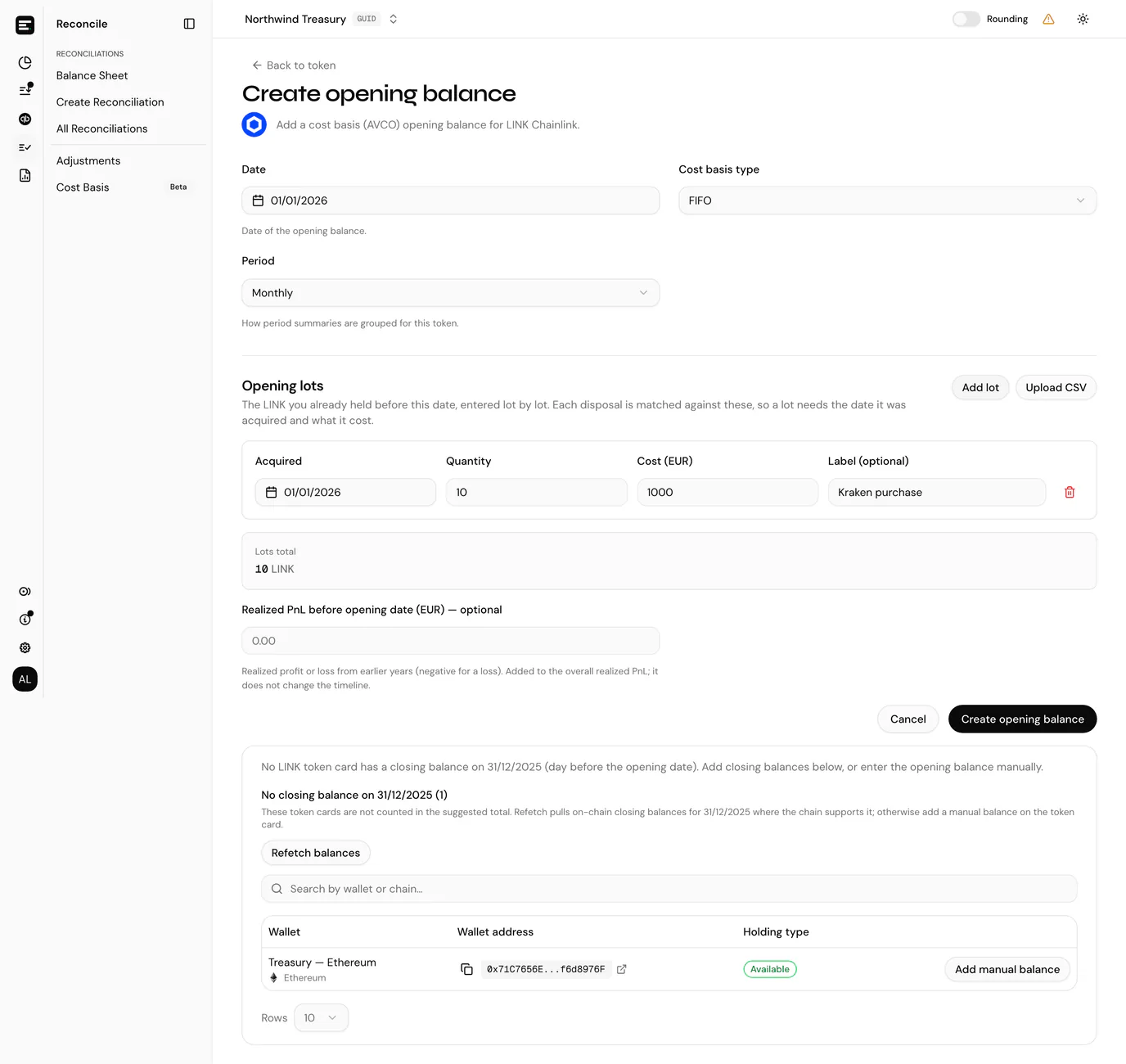
Add lot adds a row:
| Field | Notes |
|---|---|
| Acquired | When the lot was acquired. Starts at the opening balance date, and must be on or before it. |
| Quantity | How many tokens the lot holds. Must be greater than zero. |
| Cost | What the whole lot cost in your entity currency, not the unit price. Zero is allowed. |
| Label (optional) | A note to tell lots apart, such as Kraken purchase. |
The bin icon at the end of a row removes it. If you held none of the token on the opening date, leave the section empty.
Checking the lots add up
Below the lots, Lots total sums their quantities. When SimplyLedger can build a suggested balance for the date, it is shown alongside as Wallets' closing balance, with the Difference between the two. Matches means your lots account for everything your accounts held; otherwise the difference is shown in amber.
A difference does not block you from saving. Your lot records are the source here and the closing balance is a check against them, so treat a mismatch as something to explain (a missing lot, or a token card with no closing balance for the day) rather than something to force away.
Uploading lots from a CSV
Upload CSV adds lots from a file rather than one at a time. The Upload opening lots dialog links to Download a CSV template to start from.
Select CSV file. It needs a header row and is limited to 10 MB.
Match your file's columns to the lot fields. Each field has a dropdown of your headers and shows a sample value from the first row. Columns with familiar names (such as
acquired_onordate,quantityorqty,cost,labelordescription) are matched for you.Field Notes Acquired Required. The acquisition date, for example 2024-03-15.Quantity Required. Cost Required. The total cost of the lot, in your entity currency. Label Optional. Leave it Not mapped if your file has none. Add n lots. Back returns to picking a file.
The lots are added below any already on the form, where you can review and fix them before saving. Any cell that fails validation is flagged on its row. If some dates could not be read, the dialog says how many, and those rows are added with an empty date for you to pick.
Changing lots later
Once the opening balance exists, the token's page shows an Opening lots section with a row per lot: acquired date, label, quantity, cost and unit cost.
- Add lot adds another, with the same fields as on the form.
- The bin icon deletes one.
Lots cannot be edited. To correct one, delete it and add it again.
Disposals that drew on a deleted lot are recalculated from the remaining lots. Under Spec ID, a disposal identified only from that lot becomes Not identified, and one that also used other lots needs review, so identify them again.
Every change recalculates the timeline and the period summaries.
The suggested balance
SimplyLedger works out what your accounts held on the opening date rather than leaving you to add it up. The figure is the sum of every token card's closing balance on the day before the opening date. Opening on the 1st means closing on the last day of the previous month.
For AVCO the figure fills the Balance field. For a lot type it is the Wallets' closing balance your lots are checked against.
The Suggested balance panel expands to show the arithmetic: one row per contributing token card, with its account, chain or exchange, holding type and closing balance.
The Balance field stays editable. The suggestion refills it as you change the date, but only while it still holds the last suggested figure: once you type over it, your figure is kept.
When token cards are missing a balance
Cards with no stored closing balance for that day are listed separately, under No closing balance on the date concerned, and they are not counted in the suggested total. This is the part worth checking before accepting a suggestion: a total that looks low usually means cards are missing rather than that the holding was small.
Two ways to fix it, both offered on that list:
- Refetch balances pulls the on-chain closing balance for that date for each missing card on a chain that supports historical balances. It reports how many it fetched and how many it could not. The button only appears when at least one missing card can be fetched this way.
- Add manual balance opens the token card so you can enter one by hand. Your part-filled form is preserved, and returning to it refreshes the suggestion with what you added.
Exchange cards, and cards on chains without historical balance support, cannot be refetched. They always need a manual balance on the token card, and after a refetch the app says how many cards still need one.
If no card has a balance for that day, or the token has no cards at all, the panel says so and you enter the opening balance yourself.
Realised PnL from before the opening date
If the token was already being tracked before the opening date, in a previous report or an earlier system, you can carry its realised profit or loss across. Enter it as a single figure in your entity currency, negative for a loss, such as -3265.98. Leave it blank for none.
It is set on the create form as Realized PnL before opening date, and shown on the token's page as Prior realized PnL. To change it later, select the pencil beside that figure. This is the one part of an opening balance you can edit without deleting it.
The figure is added to the Overall realized PnL under the period summaries. It does not touch the timeline, the pool or any period's own realised PnL, and it cannot be posted.
Changing or removing one
Apart from the prior realised PnL, there is no edit. Delete opening balance on the token's page removes it, and the confirmation warns that it cannot be undone. For a lot type it also removes the opening lots and any Spec ID lot selections.
Deleting and recreating is how you change the date, the type or the period. Everything derived from it (the transaction timeline, running average price, realised PnL and the period summaries) recomputes from the new opening position.
Check what has already been posted
Realised PnL you have already posted is not rewritten when the opening balance changes. If a period has been posted, reconcile the postings against the new figures deliberately.
Who can set them
Creating and deleting opening balances, editing the prior realised PnL, and adding, editing or deleting opening lots, need write access. Viewers see the values without the actions, and selecting a token opens its page rather than the create form. See roles and permissions.
Next
With an opening balance in place, transactions and summaries covers the timeline it produces.