
Bills and invoices
A payment leaving your wallet usually settles a supplier bill; a receipt usually settles a customer invoice. QuickBooks already holds those documents, and unless something tells it the payment happened, they stay open.
This feature is that link. When you post a transaction to your suspense account, SimplyLedger offers the open QuickBooks bills or invoices, and the one you pick gets a payment written against it in QuickBooks as part of posting.
When the document is not in QuickBooks yet, you can raise it from SimplyLedger rather than leaving the app. That side of it has its own page: create bills, invoices and parties.
Before you start
Four things have to be in place, in this order. Each one is what makes the next available.
QuickBooks connected for the entity. See QuickBooks.
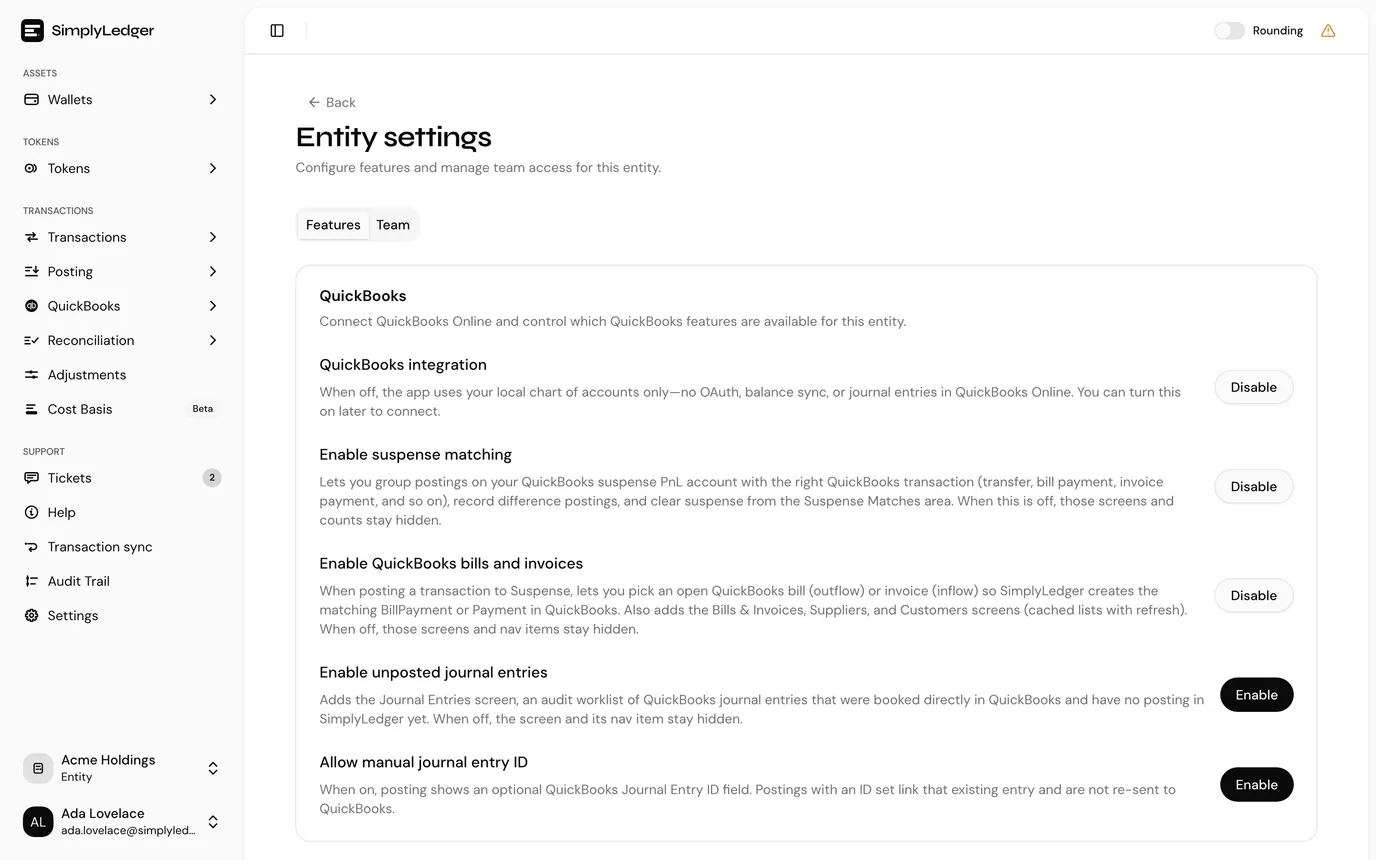
Enable suspense matching on the QuickBooks settings page (select Settings at the bottom of the sidebar's icon rail, then Entity → QuickBooks). You need this even if you never use the Suspense Matches screen: it is what puts the Suspense account type in the account picker.
Enable QuickBooks bills and invoices on the same page. This adds the Bills, Invoices, Suppliers and Customers screens, and turns on the linking described below.
A suspense account. Add it from QuickBooks Accounts, choosing the type Suspense. Pick it from your QuickBooks chart rather than inventing a number. A bill payment is written against that account as the paying account, and posting fails if the account carries no QuickBooks identifier.
The suspense account has to be a Bank account in QuickBooks
Settlement is why. A bill payment names the suspense account as the account it is paid from, and an invoice payment names it as the account the money is deposited to. QuickBooks only accepts a Bank account in either position.
So importing an account of any other QuickBooks type as Suspense is refused, with Suspense must be a QuickBooks Bank account. Pick a Bank account from the chart, or create one in QuickBooks first and import it.
An entity has one active suspense account. Adding a second is refused while the first is active; archive the old one first.
Who can do this
Changing entity settings is an owner or admin action. Adding accounts, syncing, creating documents and posting need write access. See roles and permissions.
The screens it adds
Bills and Invoices are separate pages: QuickBooks → Payables → Bills and QuickBooks → Receivables → Invoices. Each holds a cached copy of what QuickBooks has for that document type. Columns are date, due date, the document number with its QuickBooks id, the vendor or customer, memo, total, outstanding balance, and when QuickBooks created it.
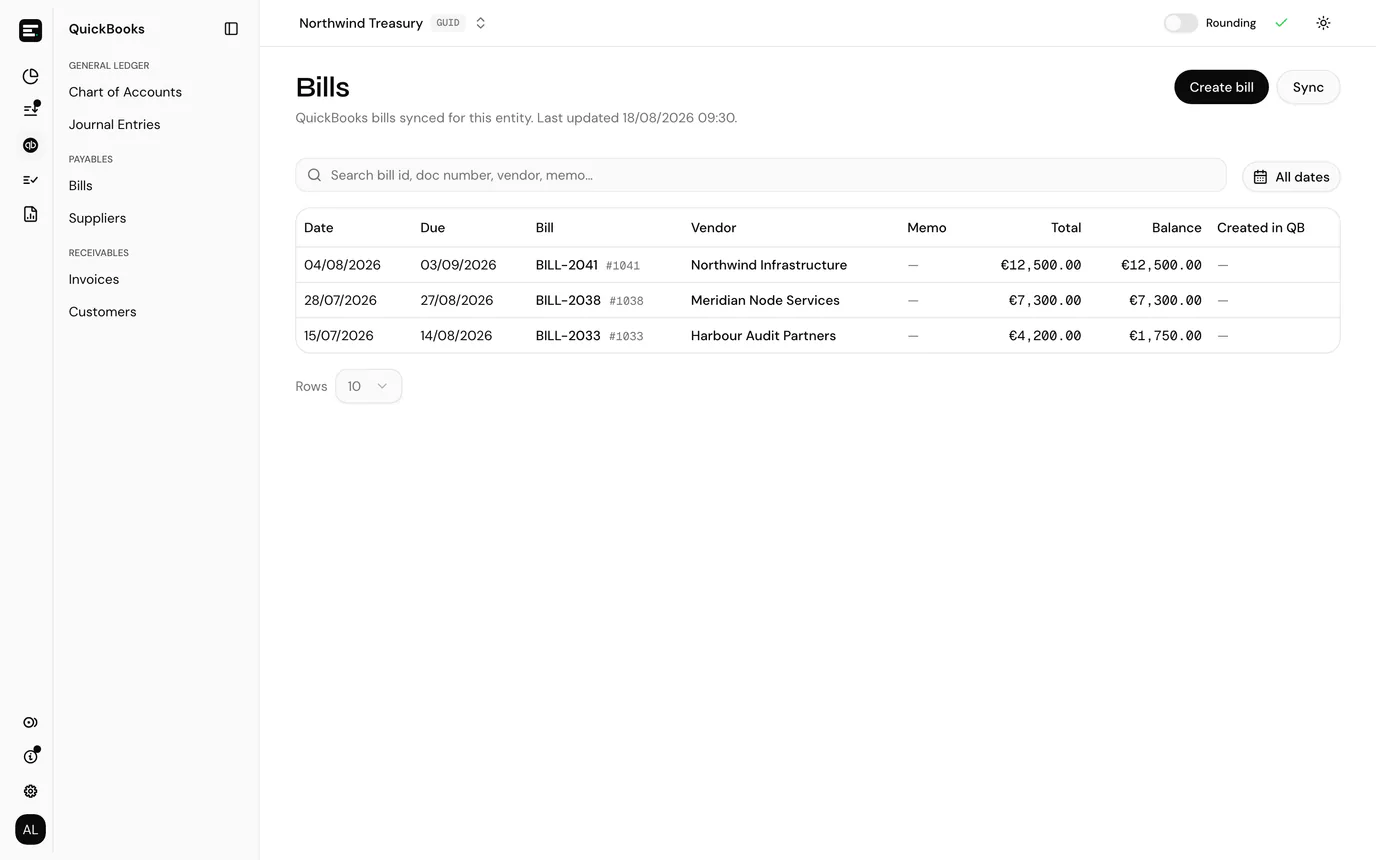
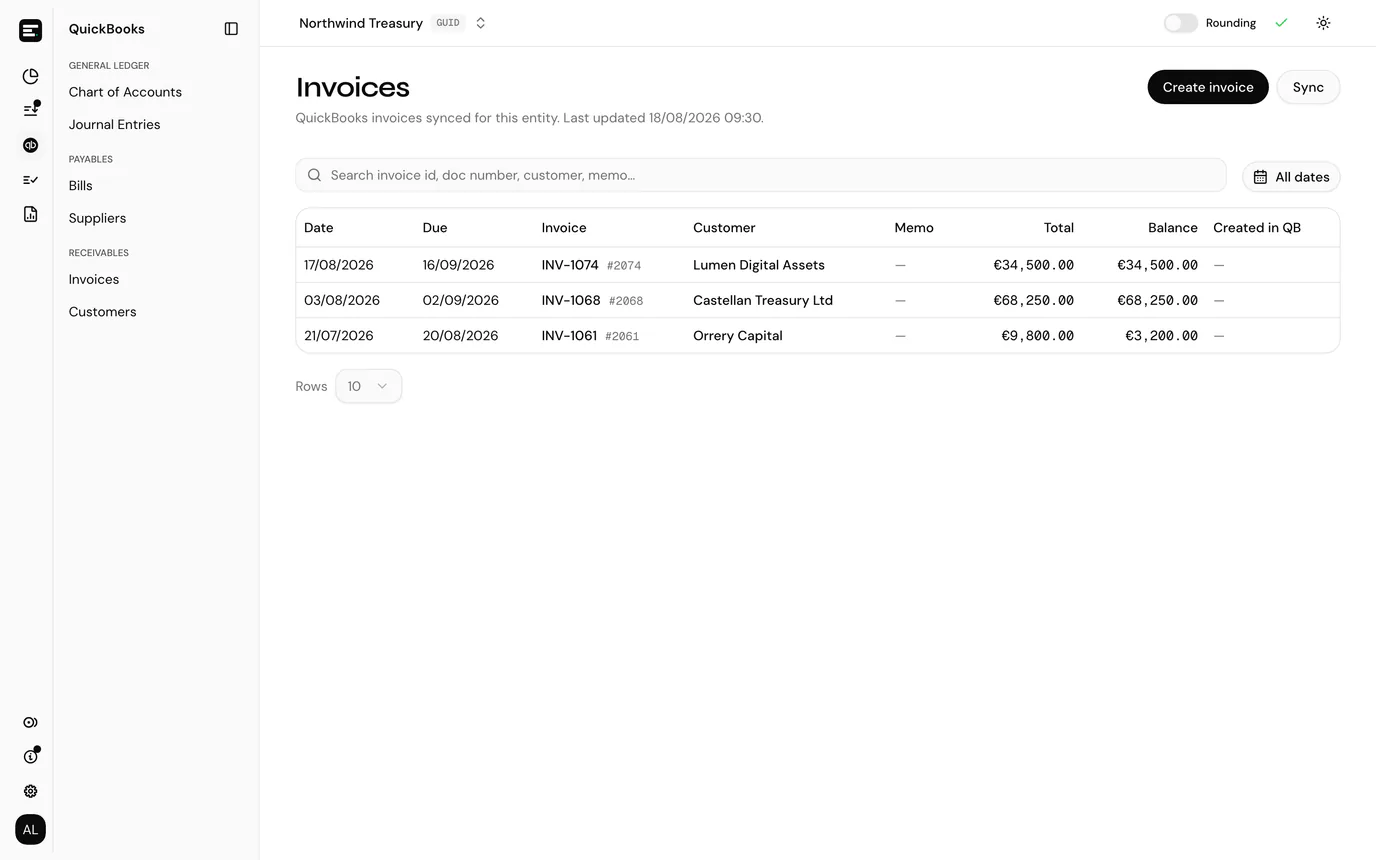
The date control at the top right filters by document date, and search matches document id, doc number, memo, and the party's name or id. A very large result set is cut off, with a line above the table saying how many of the total are shown; narrow the date range to reach the rest.
Suppliers and Customers are the same idea for the parties those documents belong to, with an Address column reading from the billing address QuickBooks holds.
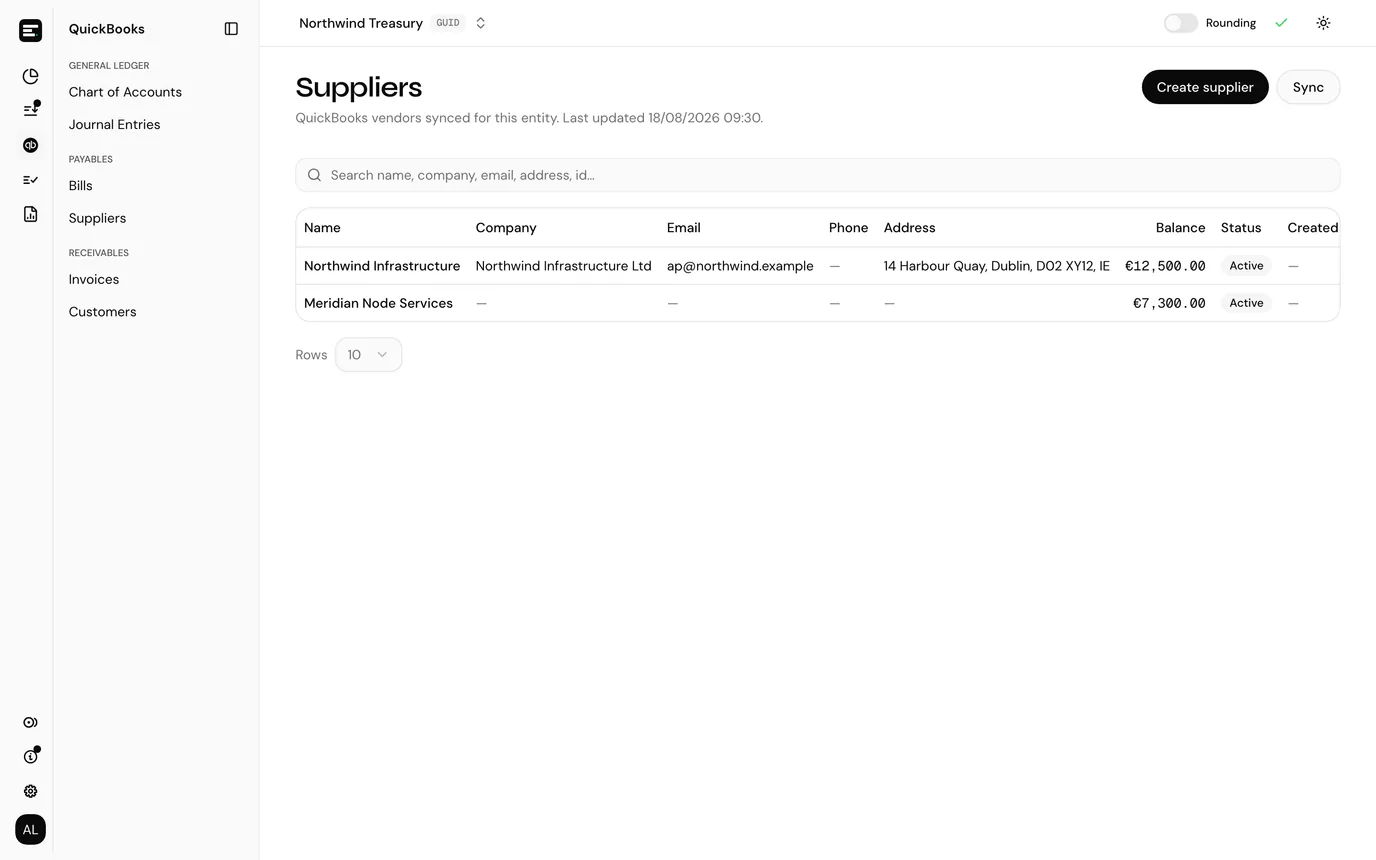
The two sides link to each other, so you can move between a party and its documents without searching twice:
| From | Select | Goes to |
|---|---|---|
| Bills or Invoices | The vendor or customer name on a row | Suppliers or Customers, filtered to that party |
| Suppliers or Customers | The Balance figure on a row | Bills or Invoices, filtered to that party |
The document page
Selecting a row on Bills or Invoices opens that document.
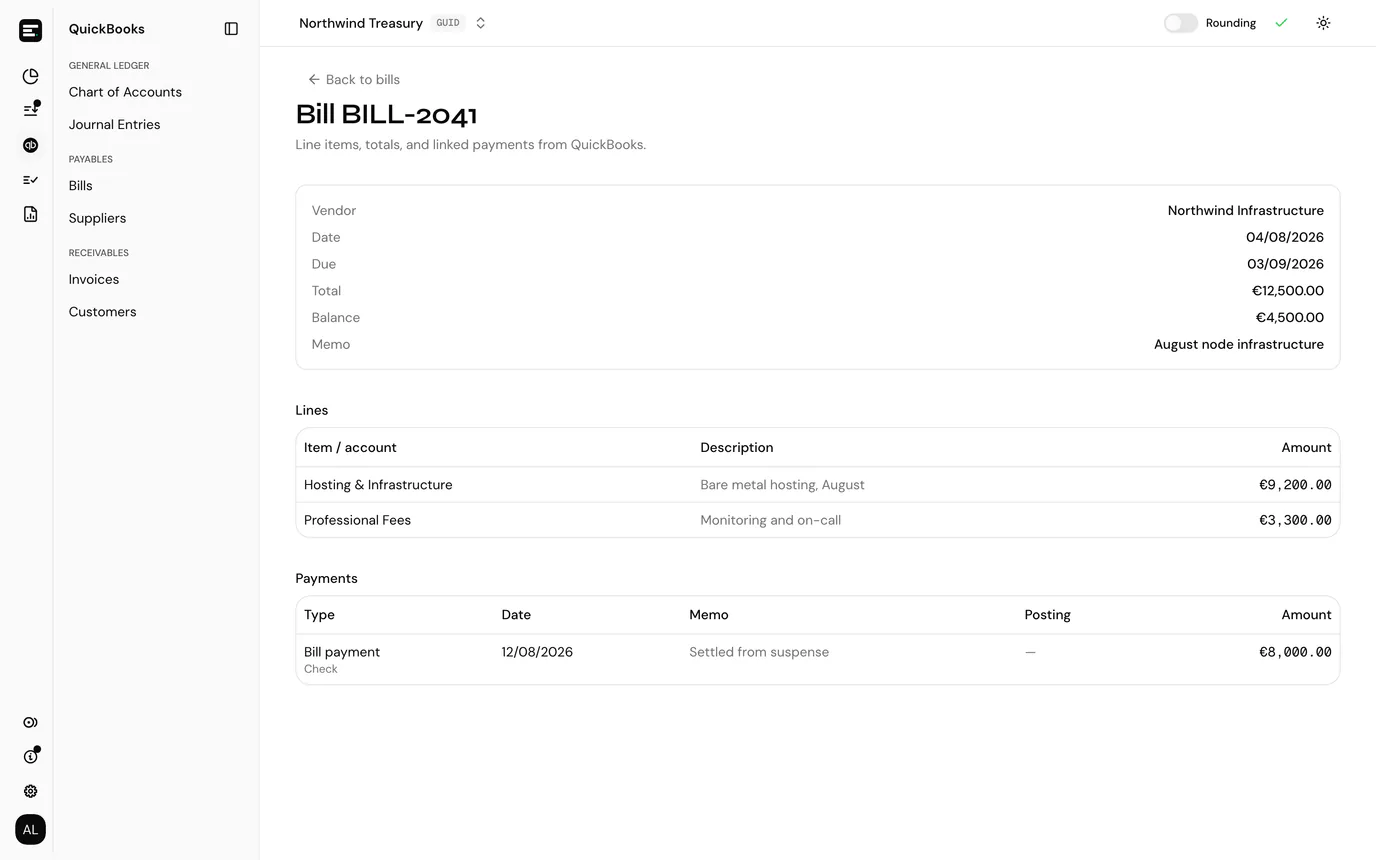
Its header holds the party, date, due date, total, outstanding balance and memo. Below that are two tables:
- Lines, each with the expense account or item it is charged to, its description and its amount.
- Payments, the settlements QuickBooks has recorded against the document. Each shows the type (bill payment or payment), its date, its memo, its amount, and the SimplyLedger posting references it came from, if it came from here. Those references link into All postings, filtered to the posting.
That last column is the audit trail through: from an open QuickBooks bill to the wallet transaction that paid it and the ledger posting that recorded it.
The document page reads live from QuickBooks, not the cache. A payment added in QuickBooks a minute ago is on it, even if the list still shows the old balance.
Cache and sync
The lists are cached. The header on Bills and Invoices says when the cache was last updated, and Sync refreshes bills, invoices, suppliers and customers together. A background sync also runs every 30 minutes, so the lists catch up on their own.
Two things do not wait for a sync:
- Anything you create in SimplyLedger is written into the cache as it is created, so it is on the list straight away. See create bills, invoices and parties.
- The picker at posting time reads QuickBooks directly, so a document created minutes ago is offered for linking whether or not the cached tables know about it.
The picker at posting time
Stage a row whose contra is a contra account set to your suspense account, and instead of dropping straight into staged, the row opens the picker.
That contra is the whole trigger. A row contra'd anywhere else stages normally, with no picker and no link.
Which list you get is decided by the sign of the staged row's Value: negative offers QuickBooks Bills, positive offers QuickBooks Invoices.
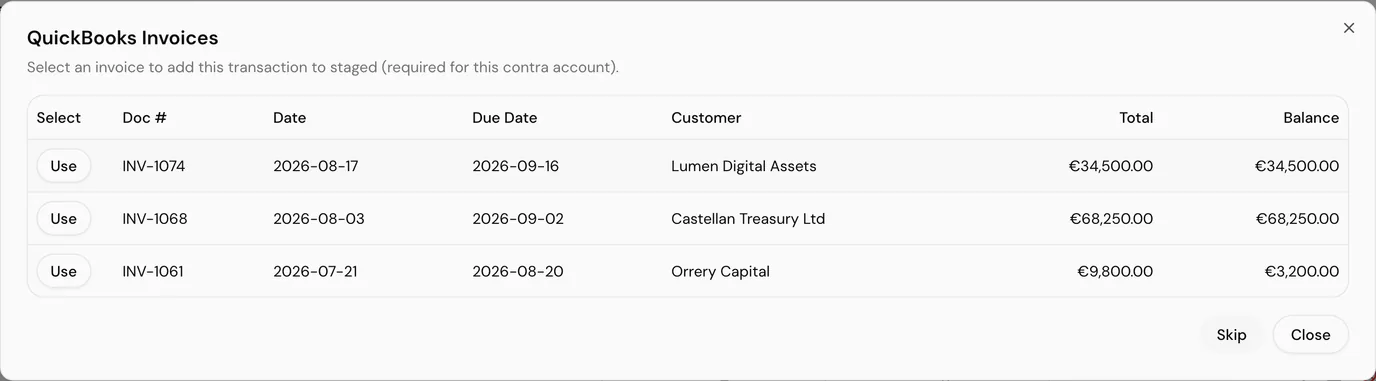
Only open documents appear. Anything with a zero balance is already settled and is not offered. Each row shows doc number, date, due date, the vendor or customer, total and outstanding balance. Use on a row links it and adds the transaction to staged in one step.
Pending rows always offer invoices
Rows staged from the pending table carry an unsigned value (a transfer out reads €10,822.25, not −€10,822.25), so every one of them lands on the invoice list, an outflow included.
A negative value comes from a row you entered yourself: Add transaction with a negative amount, or an uploaded CSV row. See adding transactions by hand. Those are the rows that reach the bill list.
Two other ways out:
- Skip stages the transaction with no document linked. It is a confirmation, not a slip, because the consequence is that nothing is settled in QuickBooks and the value sits in suspense for you to clear later.
- Close abandons the staging entirely. The row does not reach staged at all.
Attaching after a skip
There is no control on a staged row to reopen the picker. If you skip and change your mind, remove the row from staged and stage it again.
A transaction you added by hand goes through the same check: contra'd to suspense, it opens the picker just as a synced one does.
What posting does
Select Post Transactions and, for every staged row carrying a link, SimplyLedger creates the settlement in QuickBooks:
| Row | What is created | Linked to |
|---|---|---|
| Negative value, bill selected | BillPayment, paid from the suspense account | That bill |
| Positive value, invoice selected | Payment against the customer | That invoice |
These are created immediately, as part of posting, unlike journal entries, which a background sync pushes afterwards. A row with no link posts as an ordinary posting and creates nothing in QuickBooks.
Posting also records a suspense match between the suspense posting and that settlement, and stores the QuickBooks id of the payment on the posting itself. That is what lets the document page show which posting paid it, and what lets a later revert offer to remove the payment as well.
The amount comes from the posting, not the document
The payment is written for the value of the transaction you posted, not the balance of the bill or invoice. Pay a €4,000 bill with a €3,000 transaction and QuickBooks is left with €1,000 outstanding, which is usually what you want. Post a transaction worth more than the document and QuickBooks records an overpayment.
Check the value on the staged row against the Balance column before confirming.
Reverting a linked posting
Reverting from All postings works as usual for an ordinary posting. A posting that settled a bill or invoice has a second record in QuickBooks that reverting cannot decide about on its own, so it asks.
The Linked QuickBooks settlement dialog offers two ways forward:
| Choice | Effect |
|---|---|
| Retain settlement | The posting is reverted and the suspense match is removed. The BillPayment or Payment stays in QuickBooks, so the document stays settled there |
| Delete settlement | The same, and the BillPayment or Payment is deleted in QuickBooks, which reopens the balance on the bill or invoice |
Cancel leaves everything as it was, posting included.
Take Retain settlement when the money genuinely moved and the QuickBooks payment is right, and only the ledger side needs redoing. Take Delete settlement when the settlement itself was wrong: the wrong document was picked, or the transaction should not have been posted at all.
Either way the reverting side is the same as any other revert: an inverted pair of postings is written, the original journal entry is deleted in QuickBooks, and a finalised reconciliation containing either posting is reopened.
The match goes either way
Reverting removes the suspense match, so the pairing disappears from Suspense Matches whichever choice you make. Retaining the settlement retains it in QuickBooks, not in SimplyLedger.
When the picker does not appear
Work down this list; it is ordered by how often each one is the cause.
| Symptom | Cause |
|---|---|
| The row stages with no picker | The contra is not your suspense account, or is a wallet contra rather than a QuickBooks contra account |
| No picker anywhere, on any row | Enable QuickBooks bills and invoices is off, or the entity has no active suspense account |
| Suspense missing from the account type picker | Enable suspense matching is off. Turn it on first, then add the account |
| Suspense must be a QuickBooks Bank account when importing the account | The account chosen from the chart is not of QuickBooks type Bank. Pick one that is |
| No bills found for the suspense contra account | Nothing in QuickBooks is open with a non-zero balance, or the connection has expired |
| Posting refused, bills and invoices not allowed | The setting was turned off between staging and posting |
| Posting refused, no QuickBooks account id | The suspense account was created without a QuickBooks account behind it. Archive it and add it again from the QuickBooks chart |
How this differs from suspense matching
Both involve the suspense account and they act at different moments.
| When | What it does | |
|---|---|---|
| Bills and invoices | At posting time | Settles the QuickBooks document the payment relates to, so it stops showing as open |
| Suspense matching | After posting | Groups postings already sitting on suspense against the right QuickBooks transaction and clears them |
Linking at posting time is the cheaper of the two, because the attribution is done while you still have the transaction in front of you. Suspense matching is the fallback for everything that could not be attributed then.
The two meet at the match record: settling a document at posting time writes a suspense match for you, so the posting arrives already cleared rather than waiting on the Suspense Matches screen.
Next
Create bills, invoices and parties covers raising the documents themselves. Post a transaction covers the staging and posting rhythm this fits into, and hold matches is the other pairing tool, for the two legs of a swap or bridge.