
Support tickets
A support ticket is a conversation with the SimplyLedger team, kept inside the entity it concerns. Raising one from the app means the context (which entity, which account, which failed job) travels with the question.
Select Support in the sidebar's icon rail, then Tickets. The entry carries a badge with the number of unread replies waiting for you, and the Support icon shows a dot while there are any. The same area links to these Guides and the SimplyLedger Website.
Raising a ticket
New ticket opens a dialog with a subject and a message.
Rather than starting from a blank message, pick one of the quick start templates. Each fills in the subject and a message with the fields support will need, so nothing has to be asked back:
| Template | For |
|---|---|
| Request integration | An exchange or service SimplyLedger does not yet connect to. |
| Request chain | A chain that is not supported. |
| Request token | A token that is not carried. |
| Incorrect balance | A balance that does not match what you expect. |
| Missing transaction | Activity that never appeared. |
| Reconciliation issue | A reconciliation that will not agree. |
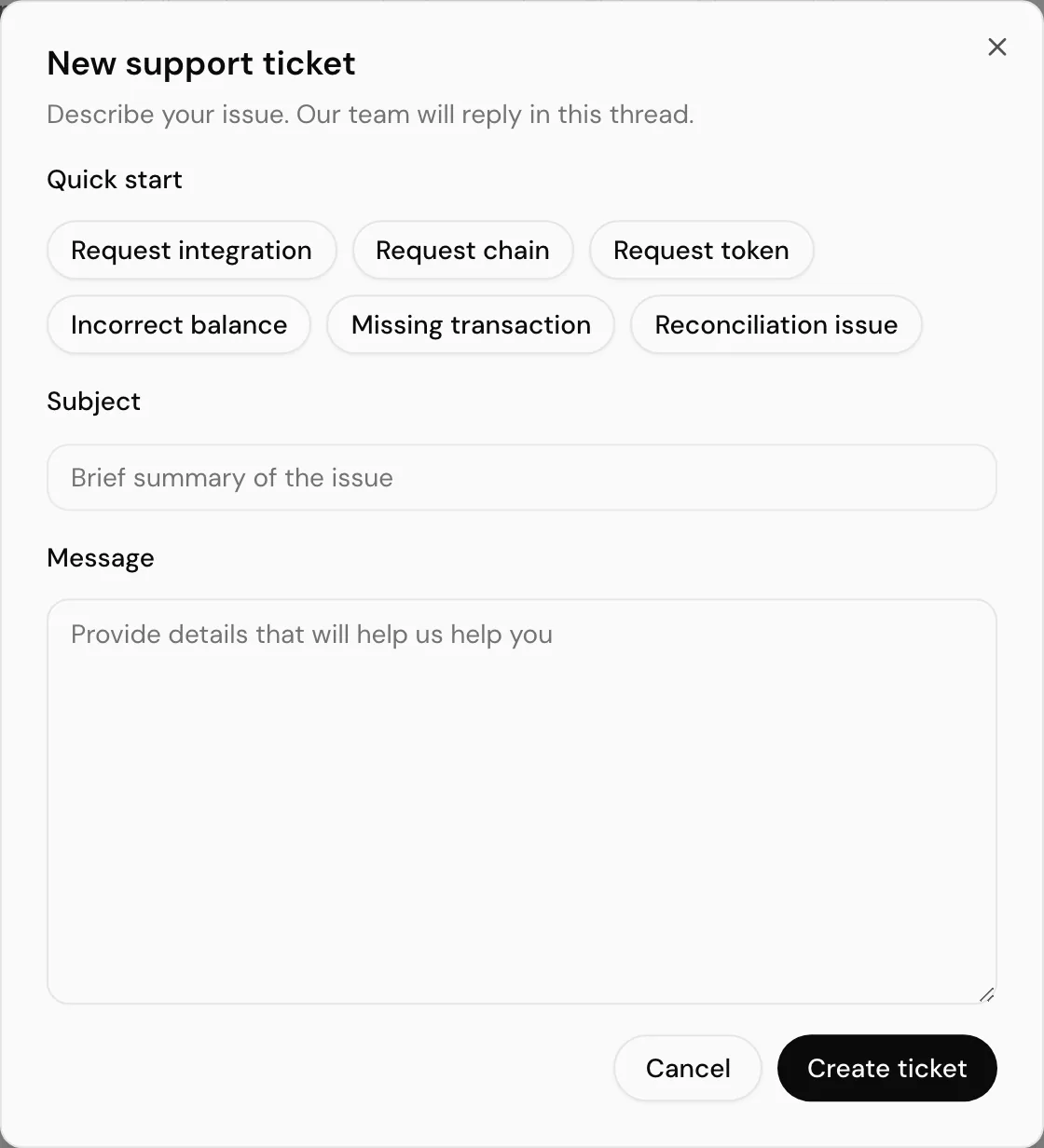
The templates are prompts, not forms. Edit anything before sending. Filling in the blanks is what makes the first reply an answer rather than a request for details.
Raising one in context
Some tickets are better raised from the screen that prompted them, and those buttons prefill the template for you:
| Where | Button | Raises |
|---|---|---|
| Posting → Pending | Report missing transaction | A missing transaction ticket. |
| Historical sync | Request attention | A ticket about a specific historical sync job, on failed jobs. |
| Settings → Entity → General, in a portfolio entity | Upgrade | A request to convert the entity to accounting mode. |
The upgrade one is worth knowing about: a portfolio entity cannot be switched to accounting by you, and this is how you ask.
Following the conversation
Opening a ticket shows the thread: your messages and support's, oldest first, with author and timestamp.
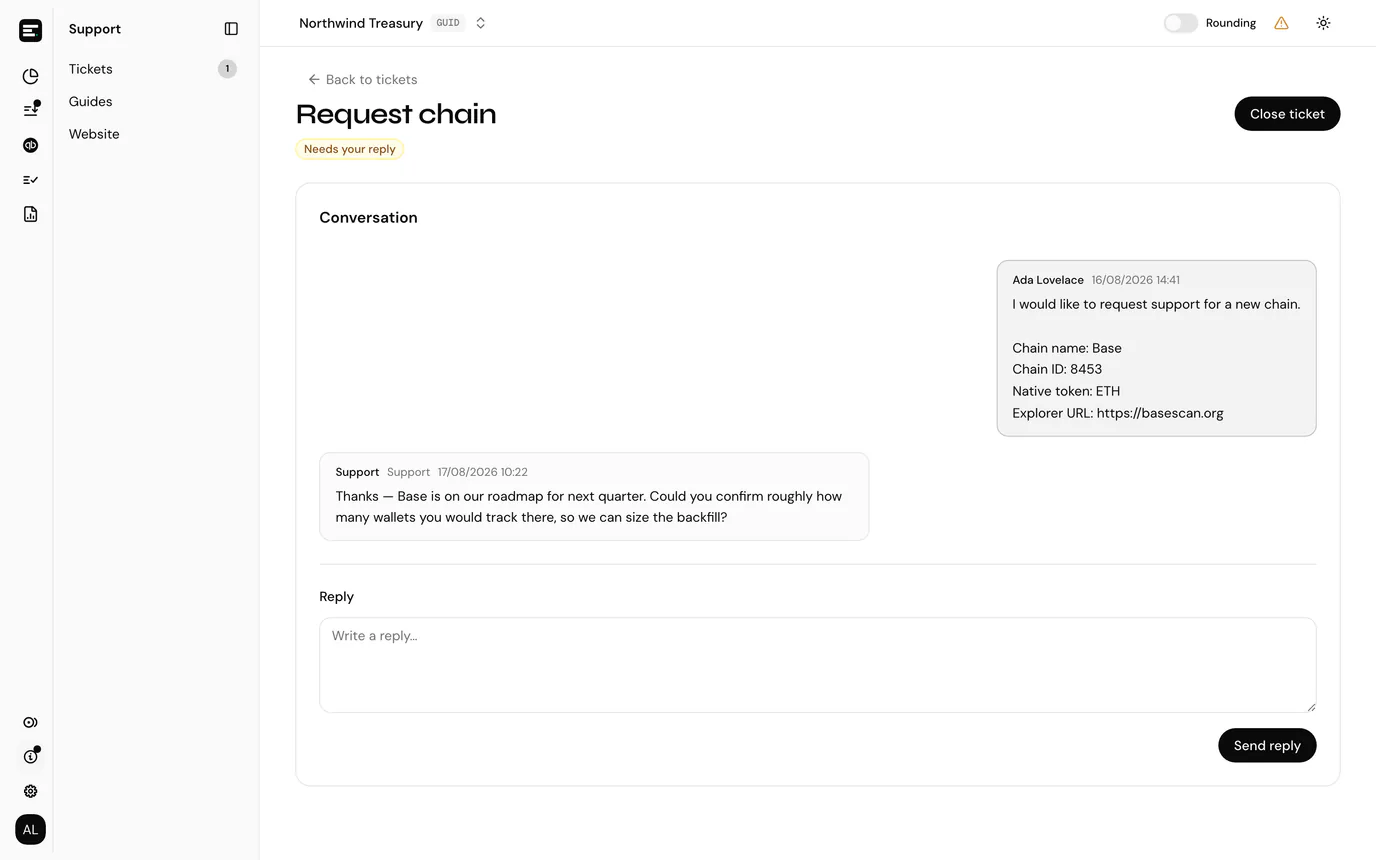
Send reply adds to the thread. Cmd/Ctrl + Enter sends without reaching for the button.
The ticket list sorts unread first and marks each with a count of new messages, so a thread that has been answered does not get lost behind older ones.
Status
Three states, and the label tells you whose turn it is:
| Badge | Meaning |
|---|---|
| Waiting for support | Support has it. Nothing needed from you. |
| Needs your reply | Support has answered and is waiting on you. |
| Closed | Finished. |
Closing
Close ticket ends the conversation, and the confirmation is explicit that you cannot reply afterwards. A closed thread stays readable; if the problem returns, raise a new ticket.
Tickets with no activity close automatically after 7 days, so a thread you never got back to will not sit open indefinitely.
Who can raise tickets
Creating tickets, replying and closing all need write access to the entity. Viewers can read the threads but not the actions. See roles and permissions.